An artist inventory system is a structured database that captures every key detail about your artwork, from catalog ID to sale price, so you can manage, value, and sell with confidence. Without one, pricing decisions rely on memory, sales records get scattered across emails, and galleries receive inconsistent information. The good news is that you can build artist inventory system infrastructure that is both practical and scalable, starting with a single spreadsheet or a purpose-built platform like Artworksoft. The industry term for this practice is art inventory management, and the standard it follows is a defined set of data fields that cover artwork identity, location, and financial performance.
What essential data should your art inventory include?
A foundational art inventory requires 12 specific data points to function properly: Catalog ID, Image URL, Title, Artist, Year, Medium, Dimensions, Location, Status, Purchase Price, Sale Price, and Buyer/Notes. These fields cover the three core functions of any inventory: identity, logistics, and valuation. Miss even one category and your records become unreliable for tax purposes, gallery submissions, or resale documentation.
The most critical field is the Catalog ID. A standardized alphanumeric scheme such as CR-24-001 gives every artwork a permanent, unique reference that never changes. This matters because location and ownership do change. A painting can move from your studio to a gallery to a collector’s home, but its catalog ID stays fixed throughout.
Separating artwork identity from market situation is a principle that professional registrars follow. The stock number identifies the object. The location and status fields describe where it is and whether it is available, on loan, or sold. Keeping these separate prevents confusion when a piece moves between venues or changes ownership.
The Status and Location fields deserve special attention:
- Status options: Available, Sold, On Loan, Reserved, NFS (Not for Sale)
- Location options: Studio, Gallery A, Storage, Collector Name, Exhibition Title
- Financial fields: Purchase Price (your cost), Sale Price (transaction value), Projected Profit (formula-driven)
- Documentation fields: Image URL, Medium, Dimensions, Buyer/Notes
Pro Tip: Never type status or location values as free text. Use dropdown validation menus instead. Free-text inputs cause data rot, where “On Loan,” “on loan,” and “loaned out” all mean the same thing but filter as three separate categories.
How to build and maintain your artist inventory system step by step
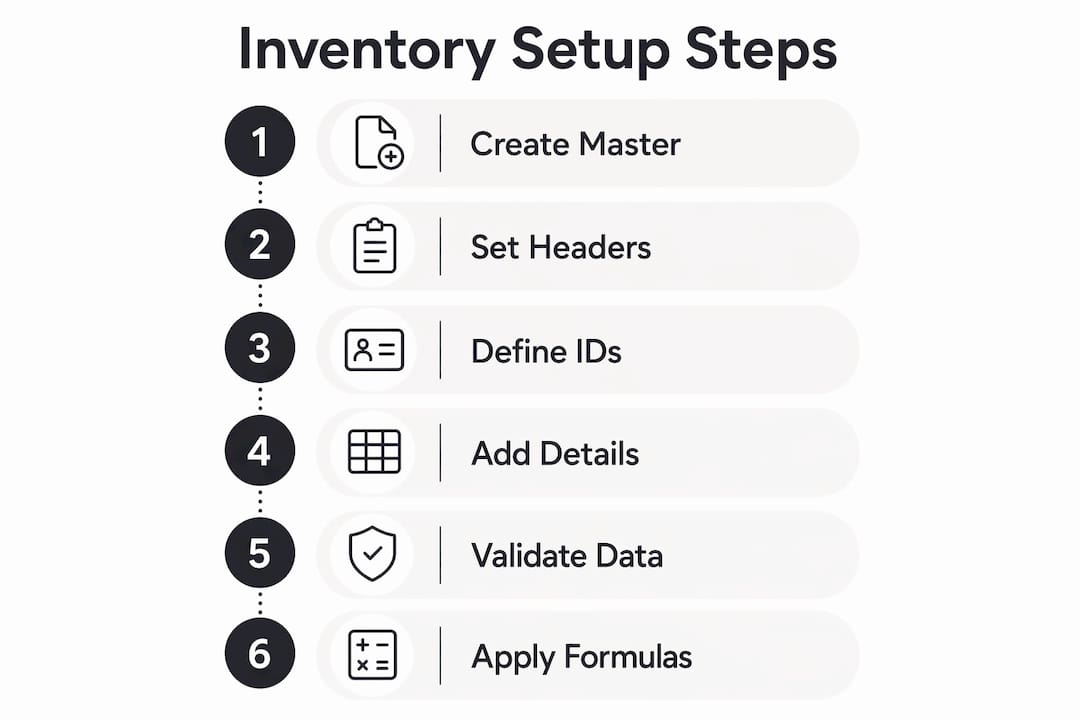
The process of creating an art inventory system follows a clear sequence. Start with one master file, define your structure, enter your data, and then maintain it consistently. Skipping any step creates problems that compound over time.
Step 1: Create your master file
Open a new spreadsheet in Google Sheets or Excel, or create a new database in a platform like Artworksoft. Name it clearly, for example “Master Art Inventory 2026.” This file is the single source of truth for your entire collection.
Step 2: Set up your column headers
Add the 12 standard fields as column headers across row one. Lock that row so it does not scroll out of view. Apply bold formatting to distinguish headers from data rows.
Step 3: Define your catalog ID scheme

Choose a format and stick to it. A common format is two letters for your initials, two digits for the year, and a three-digit sequence number. For example, JS-26-001 for the first piece cataloged in 2026. Your catalog ID scheme should separate artwork identity from sales or location changes, so the ID never needs updating even when everything else does.
Step 4: Add artwork details and images
Enter each artwork row by row. Paste image URLs into the Image URL column so you can preview works without opening separate files. Fill in medium, dimensions, and year created from your studio records or photo metadata.
Step 5: Apply data validation
Set dropdown menus for Status and Location. In Google Sheets, select the column, go to Data, then Data Validation, and enter your approved options. This one step prevents the most common cause of inventory failure.
Step 6: Add financial formulas
Create a Projected Profit column using a simple formula: Sale Price minus Purchase Price. Add a SUM row at the bottom of each financial column to track total inventory value at a glance.
| Setup Stage | Action | Common Mistake |
|---|---|---|
| File creation | One master file only | Multiple copies with conflicting data |
| Column structure | 12 standard fields | Missing financial or location fields |
| Catalog ID | Alphanumeric, fixed format | Using titles as IDs (titles change) |
| Data validation | Dropdowns for status and location | Free-text entries that break filters |
| Financial tracking | Formulas for profit calculation | Manual entry prone to errors |
Artists commonly fail by creating multiple inventory versions instead of maintaining one master file. The result is conflicting data and lost updates. Share read-only copies with galleries or collaborators, but never give anyone edit access to your master file.
Pro Tip: Semi-automated workflows using AI agents can extract metadata directly from image files, including dimensions and creation date. This cuts manual entry time significantly and keeps records current without relying on memory.
How does an artist inventory system help with valuing and documenting artwork?
Accurate valuation depends on accurate records. Tracking purchase price, sale price, and projected profit in your inventory gives you a financial picture of your practice that no other document provides. You can see which mediums sell at higher margins, which price points move fastest, and where your collection value sits at any given time.
Your inventory also functions as the primary documentation record for each artwork. This matters for several reasons:
- Provenance tracking: A complete record of where a work has been shown, sold, or loaned supports its authenticity and value over time.
- Condition documentation: Notes on condition at the time of creation or sale protect you in disputes. Artworksoft supports artwork condition documentation directly within each artwork profile.
- Tax records: Purchase price and sale price data feeds directly into income reporting. A well-maintained inventory removes the guesswork from annual tax preparation.
- Reserve pricing: Knowing your cost basis and historical sale prices helps you set reserve pricing with confidence rather than intuition.
- Gallery submissions: Galleries expect professional documentation. An inventory with complete metadata, images, and pricing history signals that you operate as a serious professional.
“An artist inventory is a living document that brings clarity and calm to the studio, enabling scalable growth of professional practice.” — Artists and Excel can be friends
Integrating images into your inventory records also supports online showcasing. When your metadata is complete, you can export or share artwork profiles without rebuilding information from scratch for each opportunity.
What are the best practices for tracking sales and transactions?
Sales tracking is where many artist inventory systems break down. The moment a work sells, three things need to update: the Status field changes to Sold, the Sale Price gets recorded, and the Buyer/Notes field captures the collector’s name and any relevant transaction details. Doing all three at the point of sale prevents gaps that are difficult to reconstruct later.
Best practices for managing sales and transactions within your inventory include:
- Update status immediately. Do not wait until the end of the month. A work marked Available when it is actually Sold creates problems if a gallery inquires about it.
- Record buyer information. First name, last name, and contact details belong in the Buyer/Notes field. This data supports future outreach, provenance records, and Certificate of Authenticity issuance.
- Log all financial terms. If a work sold at a discount, record both the list price and the actual sale price. This distinction matters for future pricing decisions.
- Share safely. When galleries or collectors request your inventory, export a filtered, read-only view. Never share your master file with edit access.
- Audit quarterly. Walk through your physical works and compare them against your inventory records every three months. Discrepancies surface quickly when you check regularly.
Pro Tip: When a work goes on consignment, create a separate Location entry for the gallery name and set Status to “On Loan.” This keeps the work visible in your inventory without marking it sold prematurely. Update both fields the moment the sale confirms.
Platforms like Artworksoft connect artwork profiles to transaction records automatically, so a completed sale updates the artwork’s status without requiring manual edits across multiple fields.
Key Takeaways
A well-structured artist inventory system requires standardized data fields, a fixed catalog ID scheme, and consistent update practices to support accurate valuation and professional sales management.
| Point | Details |
|---|---|
| Use 12 standard data fields | Cover identity, logistics, and financials to build a complete and reliable inventory record. |
| Fix your catalog ID scheme | Use an alphanumeric format that never changes, even when location or ownership does. |
| Apply dropdown validation | Set controlled menus for Status and Location to prevent data inconsistency over time. |
| Maintain one master file | Share read-only copies with collaborators and never allow edits to your source document. |
| Track sales at the point of transaction | Update Status, Sale Price, and Buyer/Notes immediately when a work sells or moves. |
Why most artists build their inventory system too late
Most artists I have worked with built their first real inventory system after a problem forced them to. A gallery asked for a complete list with pricing and images by the next morning. A tax accountant needed purchase and sale records for the past three years. A collector disputed the provenance of a piece. These situations are entirely avoidable, but they rarely motivate action until they happen once.
The artists who manage their careers most effectively treat their inventory as a professional record from the very first work. They do not wait until they have 50 pieces or their first gallery show. They start with a single spreadsheet, enter their first 10 works correctly, and build the habit before the volume makes it feel impossible.
The shift from manual to semi-automated workflows is real and worth pursuing. AI-assisted metadata extraction and platform-based record keeping reduce the time cost of maintenance to the point where it no longer feels like a burden. But the foundation is always the same: one master file, consistent fields, and the discipline to update records at the moment of each transaction.
Treat your inventory as a living document that grows with your practice. The data you enter today becomes the provenance record, the pricing history, and the professional portfolio that opens doors five years from now.
— Nealda
Artworksoft and your art inventory system
Artworksoft is built specifically for artists who need a structured, professional way to catalog, value, and sell their work without managing complex spreadsheets manually.

The platform connects artwork profiles, location tracking, and transaction records in one place. Artists can generate Certificates of Authenticity, apply a structured valuation formula, and share artwork details with galleries through controlled access. Artworksoft also supports community visibility features that extend your professional presence beyond your studio. Start your free art inventory today and bring the same structure to your collection that galleries and collectors expect from professional artists. For a deeper look at what the platform covers, the art inventory tools page outlines every feature in detail.
FAQ
What is an artist inventory system?
An artist inventory system is a structured database that records key details about every artwork, including catalog ID, medium, dimensions, location, status, and pricing. It serves as the primary reference for valuation, sales tracking, and professional documentation.
How do I build an artist inventory system from scratch?
Start with one master spreadsheet or platform, set up 12 standard data fields, define a fixed alphanumeric catalog ID scheme, and apply dropdown validation for Status and Location fields. Enter each artwork row by row and update records immediately after any sale or move.
What data fields does an art inventory need?
A complete art inventory requires Catalog ID, Image URL, Title, Artist, Year, Medium, Dimensions, Location, Status, Purchase Price, Sale Price, and Buyer/Notes. These 12 fields cover artwork identity, logistics, and financial performance.
How does inventory management support artwork valuation?
Tracking purchase price, sale price, and projected profit across your inventory reveals pricing patterns and margin data that inform future pricing decisions. Condition notes and provenance records also support valuation when works are appraised or resold.
What is the biggest mistake artists make with inventory systems?
The most common mistake is creating multiple versions of the same inventory file. Conflicting data and lost updates follow immediately. Maintain one master file and share only read-only copies with galleries or collaborators.