Digitizing an art collection means converting paper files, spreadsheets and local records into structured data inside a cloud collection management system, not simply photographing the artworks. Following this process gives you searchable catalog records, auditable provenance and movement histories, and valuation-ready data you can use for sales, loans, insurance and reporting. The sections below walk through planning, metadata design, data cleaning, migration, verification and the daily workflows that keep the system reliable after go-live.
TL;DR:
- A well documented collection may migrate within a few weeks with one dedicated person, but poor records extend cleanup; prioritize valuable, frequently requested works.
- Separate object, provenance, transaction, valuation, movement, location, and condition fields, then lock controlled vocabularies before import to prevent inconsistent names and reporting gaps.
- Record copyright and access restrictions in structured fields, then limit external visibility; owning an artwork does not automatically grant image reproduction rights.
- Use TIFF for master images, PDF/A for documents, and CSV or XML for catalog exports; keep at least two copies in separate locations.
Table of Contents
- Quick migration checklist: the step-by-step playbook
- Plan and audit: inventory your paper records and set migration goals
- Designing the metadata schema: fields, authority lists and controlled vocabularies
- Prepare and clean legacy data: normalization, temporary IDs, and common fixes
- Export, map and import: practical batch migration best practices
- Verify, reconcile and go-live: audits, logs and reconciliation steps
- Set workflows, permissions and daily operations in the new system
- Maintain and scale: backups, integrations, and sustainability practices
- Handling digital rights management (DRM) and copyright considerations for digitized images
- Best practices for long-term digital preservation including file format selection and storage media
- Legal and ethical considerations regarding digitization, especially for sensitive or restricted works
- Tools and software recommendations for digitization and cataloging
- Workflow setup for digitization projects including staffing, scheduling, and quality control
- Author perspective: why structured digitization matters for valuation and stewardship
- How Artworksoft supports this migration plan and next steps
- FAQ
- Sources
Quick migration checklist: the step-by-step playbook
Most migrations follow the same sequence regardless of collection size. We outline it here so you can scope the project before committing staff time or budget.
- Audit existing inventory, accession files and transaction documents.
- Design a metadata schema with controlled fields and authority lists.
- Clean legacy data and assign temporary IDs to undocumented objects.
- Map legacy fields to the new system’s structure.
- Run a small test import and check key fields.
- Verify and reconcile the full migration against source records.
- Set workflows, permissions and backup routines for daily use.
A collection of modest size often moves through this process within a few weeks with one dedicated person. Larger or poorly documented collections take longer because cleaning the data, not the import itself, consumes most of the time. With limited staff, prioritize high-value and frequently requested works first and migrate the rest in batches.
Plan and audit: inventory your paper records and set migration goals
Before touching any software, catalog what you actually hold. Pull together accession files, purchase receipts, loan agreements, condition reports and any spreadsheets that track location or status. The National Park Service’s documentation guidance recommends formal accession records and consistent forms as the foundation for reliable museum documentation, a principle that applies equally to a private collection or a small gallery.
While auditing, note where records physically or digitally live: locked file cabinets, a shared drive, a registrar’s personal laptop. Scattered ownership of records is one of the most common reasons migrations stall.
Use the audit to set concrete success criteria:
- Which fields are mandatory for every object record (artist, title, medium, dimensions, accession number).
- How provenance, transaction and condition history will be captured going forward.
- A realistic timeline, tied to collection size and staff availability.
- A backup plan for original paper files once digitized, since paper remains the fallback record until the new system is verified.
Designing the metadata schema: fields, authority lists and controlled vocabularies
A reliable collection record separates object information from transaction information. At minimum, your schema should include object fields (artist, title, medium, dimensions, edition), provenance fields (prior owners, acquisition date, acquisition method), transaction fields (sale, loan, consignment status), valuation fields, movement and location fields, and condition fields.
The American Alliance of Museums recommends authority lists and controlled vocabularies so that artist names, materials and status terms stay consistent across the collection. Without them, “oil on canvas” and “oil/canvas” become two different values in reports, and search results miss records that should match.
Document the schema in writing before you import anything, including field names, allowed values and who can edit each field.
- List every field name and its data type (text, date, number, controlled list).
- Assign an authority list to each categorical field (medium, status, location).
- Version the schema document so later changes are traceable.
Pro Tip: Build your controlled vocabularies from existing cataloging standards rather than inventing new terms, then lock the list before import so no two staff members enter the same concept differently.
Prepare and clean legacy data: normalization, temporary IDs, and common fixes
Legacy spreadsheets almost always contain inconsistent names, abbreviations and date formats. Before mapping anything, normalize artist names, medium descriptions and location labels so each term matches a single entry in your authority list.
Undocumented objects, pieces found in storage without accession paperwork, should not block the migration. A widely used practice assigns a temporary “found-in-collection” (FIC) number following a pattern such as X2026.01.01, letting the object enter the system while provenance research continues separately.
- Standardize naming conventions for artists, mediums and locations before export.
- Assign FIC numbers to any object lacking formal accession documentation.
- Flag records with missing fields rather than leaving them blank, so gaps are visible after import.
- Keep a separate change log of manual edits made during cleanup, apart from the original export file.
That change log matters more than it seems. If someone corrects a date or a spelling directly in the legacy system after the export was pulled, that edit will be lost at cutover unless it is tracked and reapplied.
Export, map and import: practical batch migration best practices
Export legacy records in a structured format, CSV or XML work best, since both preserve field boundaries and are supported by nearly every modern cataloging system. From there, build a field mapping spreadsheet that lines up each legacy column with its destination field in the new system.
- Export the full legacy dataset and set the file aside unchanged as your audit copy.
- Build a mapping spreadsheet connecting every legacy field to a destination field.
- Run a small test import, ten to twenty records, and check that dates, names and vocabulary terms landed correctly.
- Fix mapping errors, then run the full import in batches rather than all at once.
- Save the import log generated by the system alongside your original export.
The Archives of American Art’s digitization workflow demonstrates this staged approach: structured finding aids paired with a digital database, tested in stages before full-scale ingestion, which reduces the risk of a bad mapping corrupting an entire batch.
Pro Tip: Never delete or overwrite your original export file. If a mapping error surfaces weeks after go-live, that file is the only way to trace what the source data actually said.
Verify, reconcile and go-live: audits, logs and reconciliation steps
Once the full import is complete, verify it before treating the new system as the system of record. Sample a percentage of records across different object types and compare key fields, accession number, artist, dimensions, status, against the original source documents.
- Spot-check a sample of records across each collection category, not just the largest group.
- Compare dates, names and vocabulary terms against the audit copy of the original export.
- Reconcile any edits made to the legacy system after the export was pulled, using the change log.
- Confirm backup copies of both the legacy export and the new system’s data exist before retiring old files.
- Have one designated person sign off on the migration as complete.
Reconciliation is rarely a one-time event. Expect a second, lighter review a few weeks after go-live, once staff have used the system enough to notice mismatches that a sample check missed.
Set workflows, permissions and daily operations in the new system
A migrated collection only stays accurate if daily workflows match the new structure. Define roles early: registrars and administrators who can edit core records, conservators who log condition changes, sales staff who manage transactions, and external users such as consignors or clients who need limited, read-only access.
- Assign edit permissions by role so object records aren’t altered outside an approval chain.
- Automate movement logs so loans, sales and location changes update the record directly instead of a separate spreadsheet.
- Generate documentation, certificates of authenticity, condition reports, invoices, directly from the record rather than rebuilding them manually each time.
- Review permission settings quarterly as staff roles change.
Pro Tip: Give external collaborators a shared, view-only link to specific records instead of exporting spreadsheets by email. It keeps one source of truth and avoids version conflicts.
Maintain and scale: backups, integrations, and sustainability practices
Migration is the start of stewardship, not the end of it. Set a regular backup cadence and retain export snapshots on a schedule, monthly is common for active collections, so you can roll back if a bulk edit goes wrong.
- Schedule automatic or manual backups and store at least one copy outside the primary system.
- Retain periodic export snapshots rather than relying solely on live data.
- Integrate collection metadata with digital asset management systems or image stores where possible, since the NISO framework for digital collections identifies interoperability and sustainability as core principles for long-term digital collections.
- Set a recurring audit, annual or semiannual, to catch drift in vocabulary use or incomplete records.
- Assign ongoing curation duties to a specific role rather than leaving updates to whoever has time.
Consistent, documented schemas pay off here: a collection with authority lists and version history integrates far more easily with external reporting tools than one with free-form fields.
Handling digital rights management (DRM) and copyright considerations for digitized images
Digitizing collection records often involves images of the artworks, and those images carry their own rights questions separate from the object record itself. Copyright in the artwork typically belongs to the artist or their estate unless it has been explicitly transferred, which means owning a physical piece does not automatically grant rights to reproduce, publish or license its image.
Before adding images to shared or public-facing records, confirm what rights you actually hold. A collection record can note copyright status as a structured field, held by artist, licensed for internal use, public domain, so staff can see at a glance what is safe to share externally.
DRM considerations become relevant once images move into client-sharing tools or public galleries within your system. Restricting download access, watermarking images used for external sharing, and limiting resolution on publicly visible files are common practical safeguards. None of these replace a documented rights status field, though: the field is what tells a staff member, months later, whether an image can be used in a sale listing or a press request without checking back with the artist.
Treat copyright and reproduction rights as collection metadata, not an afterthought handled case by case. A dedicated field, reviewed at the time of accession rather than when a request comes in, prevents the common problem of discovering a rights restriction only after an image has already been shared.
Best practices for long-term digital preservation including file format selection and storage media
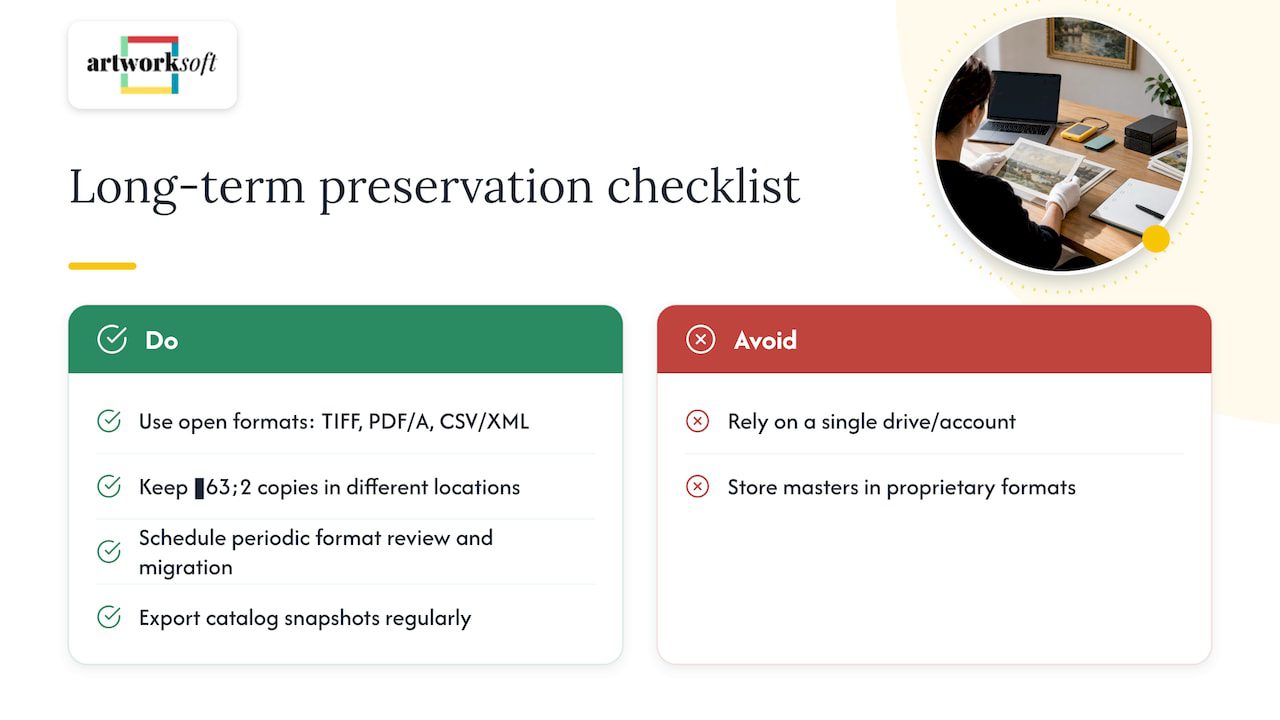
Long-term preservation depends on choices made at digitization time, not fixes applied later. Favor widely supported, non-proprietary file formats for anything meant to last: TIFF for master image files, PDF/A for documentation, and standard CSV or XML for data exports, since proprietary formats risk becoming unreadable as software changes.
Storage media matters as much as format. Relying on a single hard drive or a single cloud account creates a single point of failure. A reasonable preservation approach keeps at least two copies in different locations, commonly a cloud-hosted system for daily access and a separate backup, physical or cloud, for redundancy.
Preservation also means planning for format migration over time. File formats that are standard today may need conversion in a decade, so building a habit of periodic review, checking that master files still open correctly and that backups are current, protects against slow, invisible data loss.
For the structured catalog data itself rather than image files, the same logic applies: export snapshots in open formats like CSV or XML at regular intervals, so the underlying collection data is never locked entirely inside one vendor’s system.
Legal and ethical considerations regarding digitization, especially for sensitive or restricted works
Some works carry legal or ethical restrictions that affect how they can be digitized, documented or shared, and these restrictions should be captured as part of the record itself rather than handled informally. Works with disputed provenance, cultural sensitivity, or donor-imposed restrictions on display and reproduction need a documented status field flagging the restriction clearly.
A documented collections management policy, the kind recommended in AAM’s collections management policy guidance, gives staff a consistent reference for how to handle accessioning, loans, deaccessioning and records for works that fall outside routine cases. Having this policy in writing before a sensitive case arises prevents ad hoc decisions that are hard to reverse once an image or record has been shared.
For restricted works, limit both the image access and the metadata visible to external users. A client-facing share link should never expose a restriction note or donor condition that was meant for internal staff only. Building that access control into the system at the schema design stage, rather than remembering to restrict it case by case, is the more reliable approach.
Tools and software recommendations for digitization and cataloging
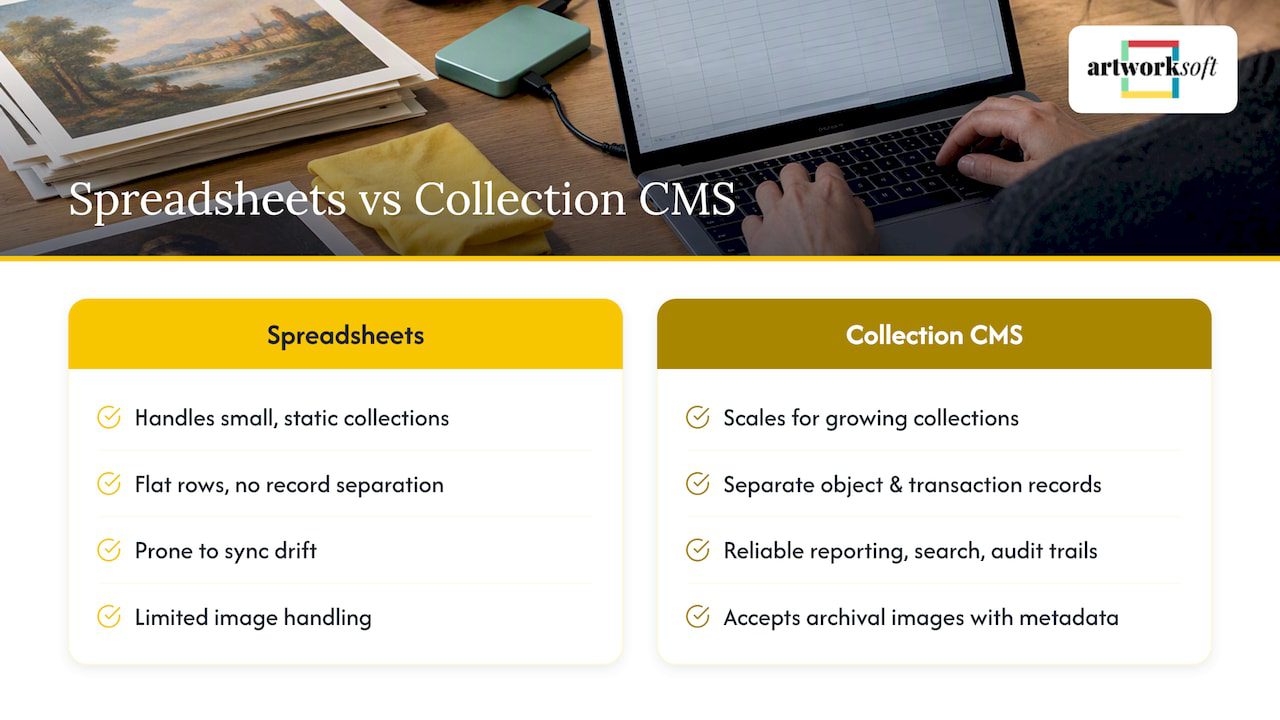
Spreadsheets handle a small, static collection reasonably well, but AAM’s guidance on collection data technology notes that a dedicated collection management system becomes the stronger administrative tool as collections grow, since spreadsheets don’t separate object records from transaction records the way accessioning, loan tracking and rights management require.
A cloud-based art management system like Artworksoft is built specifically for this separation: object profiles, provenance history, transactions and valuation data live as connected records rather than flat rows in a single sheet. That structure is what makes reporting, search and audit trails reliable as the collection grows past a few dozen pieces.
For the image side of digitization, standard archival imaging guidance calls for consistent lighting, color-accurate capture and resolution high enough to support both documentation and potential print use, with master files saved in an archival format separate from the compressed versions used day to day. The software chosen for cataloging should accept these image files alongside the structured metadata record, so a single artwork profile holds both the photograph and its documented history rather than storing them in separate systems that can drift out of sync.
Workflow setup for digitization projects including staffing, scheduling, and quality control
A digitization project needs a clear staffing plan before work begins, even for a small collection. One person should own data entry and schema decisions to avoid inconsistent formatting, while a second person, where staffing allows, reviews a sample of entries for accuracy before they’re treated as final.
Scheduling works best in batches tied to collection sections, by location, by acquisition year, or by medium, rather than attempting the entire collection at once. Batching makes quality control manageable: it’s far easier to catch a mapping error in a batch of fifty records than to untangle it after importing several thousand at once.
Quality control should happen at two points: immediately after data entry, checking that required fields are populated and vocabulary terms match the authority list, and again after import, comparing a sample against source documents. Building both checks into the schedule from the start, rather than treating them as optional cleanup, is what keeps a digitization project from needing a second full pass months later.
Author perspective: why structured digitization matters for valuation and stewardship
The biggest mistake we see is collections full of photographs with no structured data behind them. A folder of images tells you what a piece looks like, not what it’s worth, where it’s been, or who owns it. Consistent fields and documented provenance are what actually protect valuation over time, because a buyer, insurer or appraiser needs a record they can trust, not a picture they have to interpret.
— Nealda
How Artworksoft supports this migration plan and next steps
As the publisher of this guide, we built our platform around the exact steps outlined above. We offer import tools for mapping legacy spreadsheets into structured artwork profiles, a valuation tool, and movement tracking that logs loans, sales and location changes as they happen.

- Import existing records and assign structured fields using our artwork profile tools.
- Generate Certificates of Authenticity, invoices and reports directly from migrated records.
- Track provenance and movement history in connected, auditable fields.
- Start free, then add paid features as your collection grows.
Our Free Plan lets you begin cataloging immediately, and the Provenance Plan starts from $5 per month for expanded documentation and tracking features. For larger or more complex collections, our onboarding and collection management service handles the migration work directly. Explore pricing or start with our free art inventory system today.
FAQ
What does it mean to digitize an art collection?
Digitizing an art collection means converting paper records, spreadsheets and local files into structured digital records inside a cloud collection management system. The resulting records capture object details, provenance, transactions and valuation data in connected fields rather than loose documents.
How long does migrating a collection to a cloud CMS take?
Timing depends heavily on how organized the existing records are and how large the collection is. A well-documented collection of a few hundred pieces can often move through planning, cleaning and import within a few weeks, while poorly documented or very large collections take longer because data cleaning, not the import step itself, takes the most time.
What if some artworks have no accession records?
Assign a temporary found-in-collection (FIC) number so the object can enter the system while provenance research continues separately. This practitioner-recommended numbering approach keeps the migration moving without blocking on incomplete paperwork.
Can Artworksoft help with the migration itself?
Yes. Beyond the software’s import and mapping tools, our onboarding and collection management service is built specifically to handle data cleaning, schema setup and import for collections that need hands-on support.
What file format should I use to export legacy records?
CSV or XML are the most reliable choices because both preserve field boundaries and are widely supported across cataloging systems. Keep the original export file unchanged as an audit copy, separate from any cleaned version used for the actual import.
Sources
- American Alliance of Museums — Core documents
- Documenting museum collections — National Park Service
- NISO — Framework for the Principles of a Digital Collection