

Treat your collection record as part of the asset, not paperwork on the side. The single recommended approach to protect art collection data combines structured records for every artwork, a 3-2-1 backup set with an offline encrypted copy, least-privilege access with multi-factor authentication, and scheduled restore tests. The model is supported by structured records and portable exports. The sections below walk through each layer in order, from what to record to how to test that your backups actually work.
TL;DR:
- Implement a strict 3-2-1 backup approach, including offline encrypted copies stored offsite and tested through quarterly restore drills.
- Record comprehensive, structured artwork data, linking provenance and condition reports to ensure validity during transactions or claims.
- Enforce role-based access with multi-factor authentication to limit data exposure and revoke access immediately when staff or collaborators leave.
- Store preservation metadata such as checksums, format details, and event histories to verify digital file integrity decades into the future.
- Use dedicated collection management platforms that provide portable export options, movement tracking, and documentation to safeguard the asset and its data.
Table of Contents
- What to Record for Each Artwork
- How Do You Back Up an Art Collection Correctly?
- Who Should Have Access to Your Collection Data?
- What Is Preservation Metadata and Why Does It Matter?
- How Do You Run a Restore Drill on Your Art Records?
- What About the Personal Data Tied to a Collection?
- How Do You Evaluate a Cloud Storage Provider for Art Data?
- Why the Record Is Part of the Asset
- Manage Your Collection Data With Artworksoft
- Sources
- FAQ
What to Record for Each Artwork
A collection record is only as strong as its weakest field. Skip provenance, and a six-figure painting becomes a six-figure argument the day an heir, insurer, or buyer asks for proof. Every artwork profile should carry a consistent, prioritized set of fields so nothing depends on memory or a single email thread.
At minimum, secure art documentation should include:
- Descriptive data: creator, title, date, medium, dimensions, and signature or edition markings.
- Provenance and transactional records: invoices, certificates of authenticity, bills of sale, correspondence, and loan agreements.
- Condition history: dated condition reports paired with master high-resolution images and lower-resolution derivatives for sharing.
- Operational metadata: current location, movement logs, exhibition and loan history, and rights or license notes.
The exportability piece is where most collectors get caught out. A provenance research guide is only useful if the documents stay linked to the artwork record when exported, not scattered across a separate folder that nobody remembers to back up alongside it.
How Do You Back Up an Art Collection Correctly?
The 3-2-1 rule is the baseline: three copies of your data, on two different media types, with one copy stored offsite. For a collector, that translates into a working database, a local secondary copy on separate media (an external drive, not another folder on the same laptop), and an offsite copy that is encrypted and, ideally, immutable or air-gapped.
Ransomware actors actively search for and delete accessible backups, which is why CISA’s ransomware guidance recommends keeping at least one backup offline or protected with object lock so it can’t be reached, encrypted, or erased through the same credentials that run your live system. If your backup login is the same one you use daily, both copies can fall in a single breach.
Here’s a practical cadence that works for individual collectors and small studios:
- Nightly incremental backups of new records, images, and documents.
- Weekly full snapshots capturing the entire database and attachment library.
- Monthly archival snapshots stored offline or in immutable cloud storage, disconnected from daily operations.
- Quarterly restore drills to confirm the backups are not just present but usable.
Encrypt every backup and store the recovery key separately, in a physical safe or a sealed password manager entry, never on the same device as the backup itself. A separate recovery credential is what makes an offline copy actually recoverable after a compromise, rather than just technically present.
Pro Tip: An “available” backup and a “recoverable” backup are not the same thing. If the same password unlocks your live system and your backup, a single phishing email can take out both. Keep the backup credential physically or logically separate.
Who Should Have Access to Your Collection Data?
Most data exposure in small collections and studios isn’t a hack. It’s a shared login, an old collaborator who never got removed, or a spreadsheet emailed to an appraiser who didn’t need to see valuations. Access control is where art collection security usually breaks down first, because it’s the layer people skip when they’re in a hurry.
Structure access around roles, not convenience:
- Catalog-only access for volunteers or interns entering descriptive data.
- Registrar access for staff managing location and condition updates.
- Finance access limited to whoever handles valuations, invoices, and insurance.
- External appraiser access restricted to images and dimensions, nothing more.
NIST’s guidance on enterprise protections recommends limiting access and enforcing multi-factor authentication as core defenses against both external and insider risk. Where it’s available, choose phishing-resistant MFA, like a passkey or a physical security key, over a text-message code. Give every collaborator an individual login rather than a shared one, keep an audit trail of who touched what, and use time-limited links when sharing with outside appraisers or buyers. When someone leaves the project, revoke their access immediately and confirm it against a current access inventory. That last step gets skipped constantly, and it’s usually the one that matters.
What Is Preservation Metadata and Why Does It Matter?
Preservation metadata is the information that keeps a digital file readable, verifiable, and trustworthy decades from now, not just today. The PREMIS standard from the Library of Congress defines the core elements repositories should track to preserve a digital object’s identity, integrity, and history.
For an art collection, that means recording:
- A persistent identifier for each digital file, separate from any filename.
- A checksum, or fixity value, along with the algorithm used and the date it was recorded.
- File format and software environment notes, especially for proprietary or born-digital works.
- An event history logging every migration, edit, or format conversion.
- A rights statement clarifying who can use, copy, or reproduce the file.
Checksums matter more than most collectors realize. A fixity check lets you prove, months or years later, that an image file hasn’t been altered since it was captured. Without one, you have no way to confirm a “master” file is still the original. For high-value born-digital works or unusual file formats, keep notes on the software used to create them; formats age faster than paintings do, and a file that opens fine today may need migration or emulation in five years. Store this metadata alongside the artwork record itself, not in a separate technical file nobody checks, and make sure any structured export carries both descriptive and preservation fields together.
How Do You Run a Restore Drill on Your Art Records?
A backup you’ve never tested is a guess, not a safeguard. The point of a restore drill is to prove, on a schedule, that your data comes back intact, not just that a backup file exists somewhere.
- Assemble a recoverable bundle: your database export, original image masters, provenance documents, and a short data dictionary explaining what each field means and how records relate to each other.
- Restore to an isolated device or account, separate from your live system, so you’re testing the backup and not just reopening the original.
- Verify checksums against the recorded fixity values, then open every file type: images, PDFs, and any video documentation of condition.
- Confirm relationships between records held, so a certificate of authenticity still links to the correct artwork rather than floating loose in the export.
- Log the test, including who ran it and when, and keep that record with your collection management checklist.
For routine sharing with appraisers or consultants, use a sanitized location label rather than an exact address; reserve precise storage coordinates for restricted, access-controlled fields. Set a recurring calendar reminder for quarterly drills and have one person sign off on each test. Skipping this step is the single most common reason “backed up” collections turn out not to be.
What About the Personal Data Tied to a Collection?
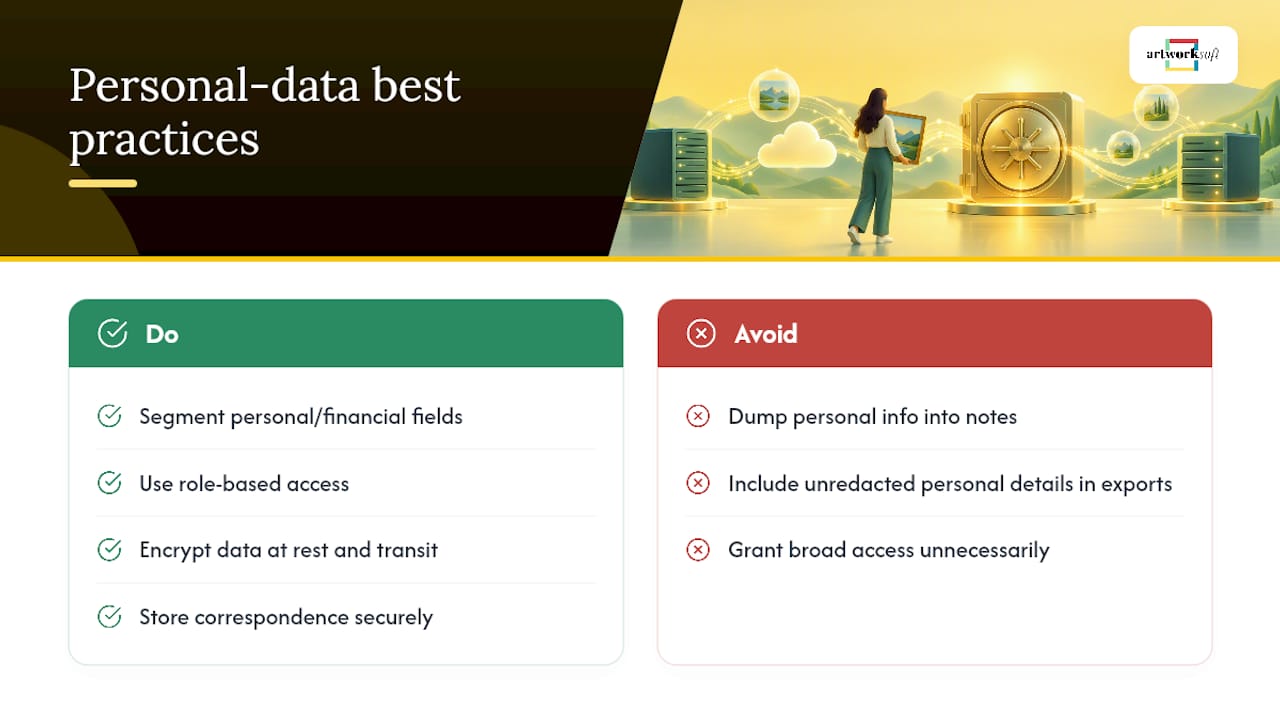
Art collection records rarely stay limited to artworks. They accumulate names, addresses, phone numbers, and banking details for owners, artists, consignors, and buyers, often woven directly into invoices and certificates of authenticity. That mix makes data privacy for art collections a genuine compliance question, not just a security afterthought.
Separate personal and financial identifiers from general catalog data wherever the system allows it. An appraiser reviewing dimensions and condition doesn’t need a seller’s home address or bank routing number in the same view. The role-based access structure covered earlier handles most of this automatically, provided fields are actually segmented rather than dumped into one open notes section.
Correspondence is the quiet risk. Emails and letters documenting provenance frequently include personal details about the people involved: family disputes, estate settlements, private sale terms. Store that correspondence securely, and think carefully before including it in an export destined for a buyer’s due diligence file. Redact what isn’t relevant to authenticity or ownership history.
If you represent artists rather than just collecting their work, their financial and contact information deserves the same treatment as a client’s. Consignment terms, payment details, and unlisted contact information are sensitive regardless of whether the art itself changes hands. CISA’s guidance on protecting personal information applies just as much to a small studio’s client list as it does to a large institution’s donor database. Treat both with the same discipline: limited access, encryption at rest and in transit, and a clear sense of who actually needs to see what.
How Do You Evaluate a Cloud Storage Provider for Art Data?
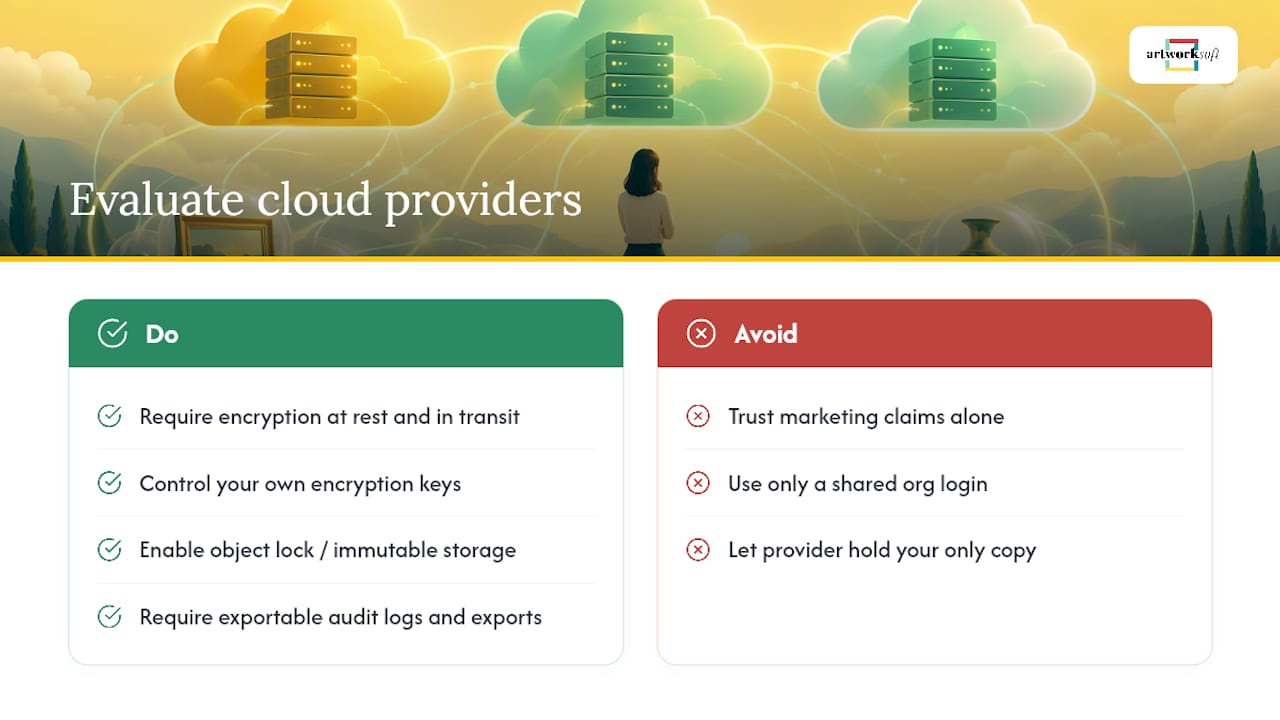
Not every cloud storage provider is built for records that need to survive decades, not just the next product cycle. Before committing your collection data to any platform, check for a specific set of security practices rather than taking a marketing page at its word.
Encryption is the floor, not the differentiator: confirm data is encrypted both at rest and in transit, using industry-standard protocols, and ask whether you control your own encryption keys or the provider does. Look for object lock or immutable storage options, which prevent files from being altered or deleted during a set retention window, a direct defense against ransomware and accidental deletion alike.
Check for granular access controls and MFA support at the account level, not just a shared organizational login. Ask whether the provider logs access and changes in an audit trail you can actually export and review, since that log is often the only way to reconstruct what happened after an incident. Confirm the provider supports structured, portable exports, meaning you can pull your full dataset, including attachments and relationships, without being locked into their interface permanently.
Finally, ask about their own backup practices. A provider storing your only copy is a single point of failure regardless of how secure their systems are. The 3-2-1 principle applies to your cloud vendor too: their infrastructure should never be the sole copy of irreplaceable collection data.
Why the Record Is Part of the Asset
Collectors often treat documentation as paperwork that trails behind the object. It isn’t. A missing invoice can stall an insurance claim; a broken provenance chain can kill a sale or a loan; an untested backup can turn a ransomware incident into permanent loss. The record and the object are one asset, and structured artwork profiles, provenance documents, and exportable reports exist to make that stewardship operational rather than aspirational. The most common mistakes are shared logins, backups nobody has tested, and location data shared too freely. Each has a straightforward fix, and none of them require rebuilding your process from scratch.
— Nealda
Manage Your Collection Data With Artworksoft
Building this checklist by hand across spreadsheets, cloud drives, and email threads works until it doesn’t. This platform is designed to close that gap for collectors and galleries who want structured records without stitching together five separate tools.

It provides a structured profile for each artwork covering provenance, condition, valuation, and location, with certificates of authenticity and other documentation generated as professional PDFs rather than as loose files. Movement and location tracking keeps a running history instead of a single “last known” note, and exportable reports allow data to leave the platform in a usable, portable form whenever needed, whether for an insurer, a buyer, or backup purposes. Galleries and consultants managing larger inventories can also draw on onboarding and ongoing collection management services if setting up structured records from scratch feels like more than a solo project.
Artworksoft offers a Free Plan to start organizing a collection, with the Provenance Plan available from $5 per month for expanded documentation and export features. If you’re ready to see how a structured record compares to your current spreadsheet, start with the free plan and import your first artworks today.
Sources
- Data backup options — CISA
- PREMIS: Preservation Metadata Maintenance Activity — Library of Congress
- NIST guidance on enterprise protections and access controls — NIST
FAQ
What Is the 3-2-1 Backup Rule for Art Collections?
The 3-2-1 rule means keeping three copies of your collection data, on two different types of media, with one copy stored offsite, following practical data-security advice for small organizations and collections. For collectors, that’s typically your live database, a local external drive backup, and an encrypted offsite or cloud copy that isn’t reachable with your everyday login credentials.
How Often Should I Back Up My Art Collection Data?
Nightly incremental backups, weekly full snapshots, and a monthly archival snapshot stored offline cover most collectors’ needs without becoming a burden. Pair that schedule with quarterly restore drills to confirm the backups actually work, not just that they exist.
What Fields Should an Artwork Record Include?
At minimum, record the creator, title, date, medium, dimensions, provenance documents, condition history, current location, and images. Keep attachments like invoices and certificates of authenticity linked to the record so exports carry both the data and the supporting documents together.
Does Artworksoft Help With Backups and Data Security?
Artworksoft supports structured, exportable artwork records with linked documentation, movement tracking, and portable exports, which form the foundation of a sound backup strategy. Collectors still need their own backup and encryption practices around any platform, following guidance like CISA’s 3-2-1 rule.
What Is Preservation Metadata and Do I Need It?
Preservation metadata includes checksums, format details, and event histories that prove a digital file hasn’t been altered and remains readable over time. The PREMIS standard outlines these elements, and they matter most for high-value images and born-digital artworks where authenticity depends on file integrity.











