


Digital documentation is the creation, capture, and governance of records in digital form, whether born natively in software or converted from physical originals, so they remain authentic, retrievable, and legally defensible over time. The single most practical step you can take this week is to establish a capture → classify → govern workflow: decide how records enter your system, how they are labeled, and who controls them. Every trustworthy digital document rests on three properties: authenticity (it is what it claims to be), integrity (it has not been altered without a trace), and discoverability (it can be found and understood by both humans and machines). Standards bodies such as ISO, the Society of American Archivists, and the Library of Congress have each formalized these properties, and platforms like Artworksoft apply them directly to specialized collection workflows.
What types of digital documentation do professionals manage?
Digital records span every industry and function. Mapping your own inventory to established categories is the first step toward setting appropriate retention, access, and preservation policies.
Core document categories:
- Transactional records — invoices, purchase orders, receipts, sales agreements
- Certificates and credentials — Certificates of Authenticity, professional licenses, diplomas, compliance certificates
- Contracts and legal instruments — NDAs, service agreements, deeds, wills
- Technical documentation — CAD files, engineering drawings, software specifications, manuals
- Images and media — photographs, video recordings, audio files, 3D scans
- Metadata records — catalog entries, finding aids, rights statements, provenance notes
- Preservation masters — archival-quality TIFF or PDF/A files held for long-term access
Industry-specific examples:
- Legal: court filings, discovery documents, signed affidavits, chain-of-custody logs
- Healthcare: patient records, consent forms, clinical notes (subject to HIPAA)
- Museums and collections: condition reports, provenance dossiers, loan agreements, acquisition records
- HR and payroll: employment contracts, performance reviews, tax forms (W-2, 1099), I-9 records
- Finance: audit reports, bank statements, regulatory filings, board minutes
Accessibility is a structural requirement, not an afterthought. PDFs must be tagged with logical reading order; Word documents need proper heading hierarchies; images require descriptive alt text; multimedia files need captions. The University of Washington’s accessibility checklist provides a practical starting point for Office documents and PDFs, covering headings, contrast ratios, and navigation structure. Records that fail basic accessibility standards are harder to search, harder to audit, and potentially non-compliant with Section 508 of the Rehabilitation Act for US federal contractors.
How do you create reliable digital documents from the start?
The quality of a digital document is largely determined at the moment of creation or capture. Retrofitting metadata and structure onto poorly created files costs far more time than getting it right initially.
Step-by-step creation checklist:
- Choose the right format. Select PDF/A for preservation copies, native application formats (DOCX, XLSX) for working drafts, and open formats (ODF, SVG) where long-term interoperability matters. Proprietary formats without an open specification create migration risk.
- Set capture quality. For scanning, use a minimum of 300 DPI for text documents and 600 DPI for images or fine-detail records. Enable OCR (optical character recognition) to make text machine-readable and searchable.
- Embed metadata at creation. Title, creator, date, subject, and rights information should be added before the file is saved for the first time, not after distribution.
- Apply access controls. Decide at creation whether the document is public, internal, confidential, or restricted. Set permissions accordingly in your document management system (DMS).
- Produce an archival copy. Save a preservation master in PDF/A or TIFF alongside any working copy. The Digital Documentation Process framework recommends creating a preservation package and catalog record at the point of capture, while context is fresh.
Format guidance by use case:
- Editable working copy: DOCX, XLSX, PPTX (retain source formatting and revision history)
- Distribution copy: PDF (with embedded fonts and tagged structure)
- Preservation master: PDF/A-3 or TIFF (no external dependencies, self-contained)
- Technical drawings: SVG or DXF alongside a PDF/A export
Pro Tip: Name files at the moment of creation using a consistent scheme: [ProjectCode][DocumentType][YYYYMMDD]_[Version]. A file named COA_OilOnCanvas_20250315_v1.pdf is findable in five years; “scan001.pdf” is not.
Accessibility at authoring time saves significant remediation effort later. Use built-in heading styles in Word and Google Docs rather than manually bolded text. Export to tagged PDF rather than printing to PDF. The University of Houston System’s document structure guidance identifies content, structure, navigation, and metadata as the four foundational elements of a well-formed digital document.
What tools and workflows cover the full document lifecycle?
No single tool handles every stage of the document lifecycle well. The practical approach is to select best-fit tools for each stage and connect them through standardized metadata and integration APIs.
Tool categories by function:
- Capture and scanning: flatbed scanners with TWAIN drivers, mobile capture apps (Adobe Scan, Microsoft Lens), large-format scanners for technical drawings
- OCR processing: ABBYY FineReader, Adobe Acrobat Pro, Tesseract (open source) for converting scanned images to searchable text
- Document management systems (DMS/ECM): platforms that handle storage, versioning, access control, and workflow routing
- Digital asset management (DAM): specialized systems for managing rich media (images, video, audio) with media-specific metadata schemas
- Backup and archival storage: cloud object storage (AWS S3 Glacier, Azure Archive), tape-based archival for long-term preservation masters
- Search and indexing: full-text search engines (Elasticsearch, Apache Solr) integrated with your DMS for cross-collection retrieval
- Signing and verification tools: DocuSign, Adobe Sign, and similar platforms for legally compliant electronic signatures with audit trails
Recommended end-to-end workflow:
- Capture: scan or author the document; set DPI, OCR, and format at this stage
- Classify: assign document type, apply naming convention, and route to the correct folder or collection
- Enrich: add or verify metadata fields (title, creator, date, rights, provenance, checksum)
- Store: commit to primary storage with access controls applied; generate preservation master
- Secure: verify encryption, set retention period, log the ingest event in the audit trail
- Share: distribute via controlled links or role-based access; never email uncontrolled copies of sensitive records
- Preserve: schedule periodic checksum verification, format migration reviews, and backup validation
Selection criteria for a DMS or workflow platform:
- Scalability to your projected record volume over three to five years
- Support for custom metadata schemas, not just fixed fields
- Granular access controls at the document and folder level
- Immutable audit logs that cannot be edited by administrators
- Open API or native integrations with your CRM, ERP, or asset management system
- Export capability in open formats (not vendor-proprietary only)
How does disciplined documentation work in practice? An art collection example
Art collections present one of the most demanding digital documentation challenges: each object has a unique physical identity, a provenance history that may span decades, and a market value directly tied to the quality of its documentation. The workflow below illustrates how the principles covered in this guide apply in a concrete professional context.
A complete documentation workflow for a single artwork:
- Capture: photograph the work at a minimum of 600 DPI in RAW format; document front, back, signature, and any condition details
- Certificate of Authenticity generation: produce a PDF/A document embedding artist name, title, medium, dimensions, date of creation, edition information, and a unique identifier linked to the physical work
- Provenance record: document the chain of ownership from creation to current holder, with dates, transaction references, and supporting evidence
- Condition report: record the physical state at acquisition and at each subsequent inspection, with dated photographs and assessor credentials
- Movement log: track every location change, loan, exhibition appearance, or storage transfer with timestamps and responsible parties
Artworksoft implements this workflow through structured art digital archiving tools that connect each artwork to its metadata record, movement history, and documentation outputs in a single searchable system. The platform’s professional documentation features generate Certificates of Authenticity and condition reports as formatted PDF outputs, with all underlying metadata retained for audit and valuation purposes.
Sample metadata fields for an artwork record:
- Artist name and nationality
- Title and date of creation
- Medium and support (e.g., oil on linen)
- Dimensions (height × width × depth in inches/cm)
- Edition and series information (if applicable)
- Provenance notes (previous owners, auction records, exhibition history)
- Certificate of Authenticity reference number
- Condition grade and last inspection date
- Current location (gallery, storage, loan)
- Digital checksum of the preservation master image
For collectors and galleries evaluating how authentication affects artwork price, the quality of underlying documentation is often the deciding variable between a confident sale and a disputed transaction.
How do you get a digital documentation program running quickly?
The most common reason documentation programs stall is scope: organizations try to document everything at once and document nothing well. A phased approach with clear weekly milestones produces better results than a comprehensive rollout that never launches.
Prioritized implementation checklist:
- Week 1: Inventory critical records. Identify the ten to twenty record types your organization cannot operate without (contracts, licenses, financial records, key correspondence). These are your pilot scope.
- Weeks 2–4: Run a capture pilot. Apply the capture → classify → govern workflow to the critical records identified in Week 1. Document what works and what breaks.
- Month 2–3: Define metadata and storage policy. Formalize your metadata schema, naming convention, retention schedule, and storage architecture based on pilot findings.
- Month 3–6: Roll out and train. Extend the workflow to remaining record types; train all staff who create or manage records; document the policy in writing.
Timeline estimates:
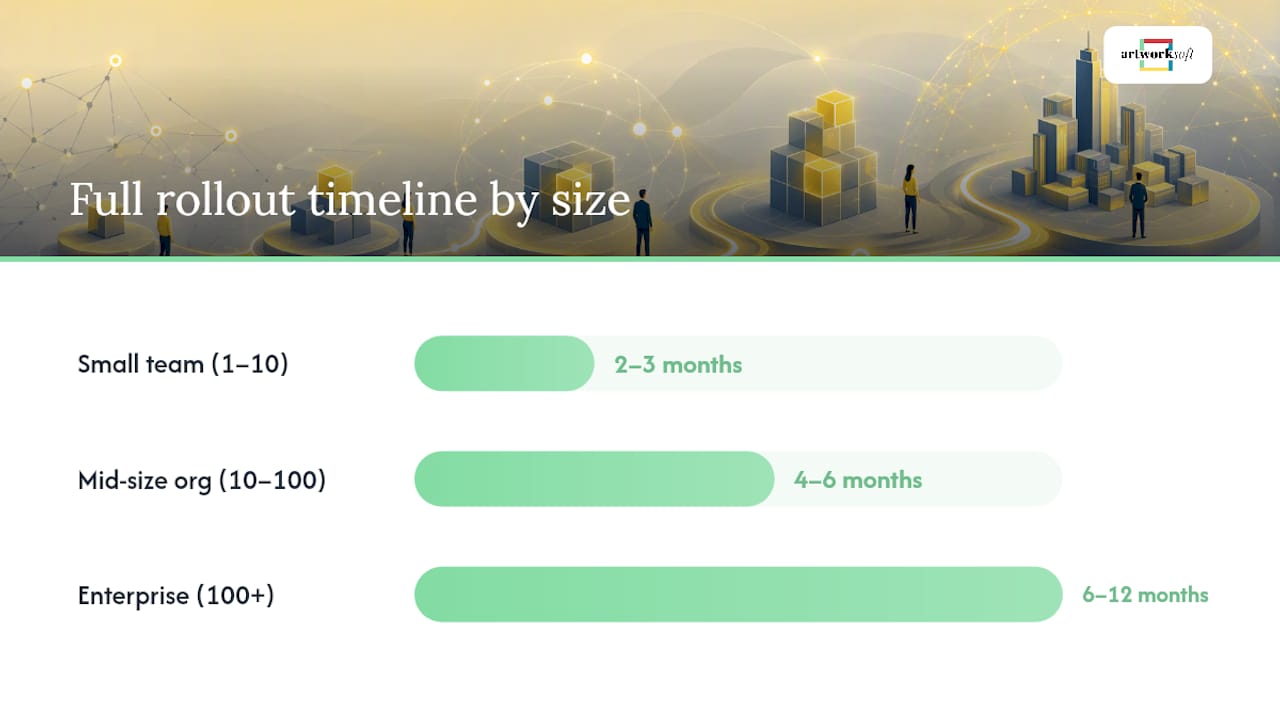
- Small team (1–10 people): a functional pilot is achievable in two to three weeks; full rollout in two to three months
- Mid-size organization (10–100 people): pilot in four to six weeks; full rollout in four to six months with dedicated project ownership
- Enterprise (100+ people): phased rollout by department over six to twelve months; requires a formal records management policy and executive sponsorship
Common pitfalls to avoid:
- Starting with format selection before defining what records you actually have
- Building a metadata schema with too many required fields, which staff skip under time pressure
- Treating backup as equivalent to archival preservation (they serve different purposes)
- Failing to assign a named owner for each record category
- Neglecting to plan for format migration: the formats you choose today will need to be reviewed in five to seven years
The Digital Documentation Process framework recommends planning documentation prospectively, creating preservation packages and metadata records while the context is still available. Retroactive documentation of poorly captured records is consistently more expensive and less reliable than getting the workflow right at the start.
Key Takeaways
Trustworthy digital documentation requires authenticity, integrity, and discoverability, built in at the point of capture and maintained through consistent metadata, access controls, and format standards.
| Point | Details |
|---|---|
| Start with a defined workflow | Adopt a capture → classify → govern sequence before selecting tools or formats. |
| Format choice determines longevity | Use PDF/A for preservation masters and open formats to avoid vendor lock-in over time. |
| Metadata is the foundation | Embed title, creator, date, checksum, and rights at creation; retrofitting costs more than doing it right initially. |
| Security is an ongoing discipline | Role-based access, MFA, audit logs, and scheduled checksum verification protect record integrity continuously. |
| Artworksoft for art collections | Artworksoft applies these principles through structured metadata, COA generation, and movement tracking for artwork records. |
The metadata gap most professionals underestimate
The conventional wisdom on digital documentation focuses on format and storage. Choose PDF/A, back up to the cloud, and you are covered. That framing misses the more consequential problem: most organizations have reasonably well-formatted files and almost no usable metadata.
A document without reliable metadata is effectively invisible to any system that did not create it. It cannot be searched accurately, cannot be migrated confidently, and cannot be authenticated in a dispute without manual reconstruction of its history. The format is the container; the metadata is the evidence. Organizations that invest in storage infrastructure while neglecting metadata governance are building well-organized filing cabinets with no labels.
Two trends are shaping this problem in the near term. AI-assisted metadata generation is becoming genuinely useful: tools that can read a document’s content and propose title, subject, and classification fields reduce the friction of metadata entry significantly. The risk is over-reliance on AI-generated metadata without human review, particularly for records where provenance and rights statements require human judgment. The second trend is stricter audit and privacy requirements. US regulators and courts are increasingly scrutinizing the completeness of electronic audit trails, and organizations that cannot produce a clean chain of custody for key records face real legal exposure.
The practical caution worth tracking is format lock-in. As more organizations migrate to cloud-native DMS platforms, the temptation is to accept vendor-proprietary export formats in exchange for convenience. A record that can only be exported in a format readable by one vendor’s software is not truly preserved. Demand open-format export as a contractual requirement before committing to any long-term platform relationship.
Artworksoft brings structured documentation to art collections
For artists, collectors, and galleries, the gap between owning art and owning well-documented art is the difference between an asset and an unverifiable object. Artworksoft closes that gap by providing a structured platform where every artwork is connected to its metadata record, provenance history, condition reports, and professionally generated documentation outputs in one place.

The platform generates Certificates of Authenticity and condition reports as formatted PDF documents, maintains a searchable movement log for every location change, and supports AI-assisted valuation to reduce pricing uncertainty. Unlike generic document management tools, Artworksoft is built around the specific metadata schema that art transactions, insurance appraisals, and museum loans require. The result is a collection that is audit-ready, sale-ready, and professionally presentable at any point.
A software platform accelerates adoption of good documentation practices, but it does not replace a written retention policy, legal counsel for complex provenance questions, or professional appraisal for high-value works. Artworksoft handles the operational layer: capture, classify, store, and share. Policy and legal judgment remain the organization’s responsibility.
Turn your collection into a well-documented asset with Artworksoft, or start a free account to see the documentation workflow in practice.
Useful sources and further reading
The sources below underpin the guidance in this guide. Each one addresses a specific aspect of professional digital documentation practice.
SAA Dictionary: digital document — The Society of American Archivists’ authoritative definition of digital documents, covering the born-digital vs. digitized distinction and provenance requirements. Use this when establishing terminology with colleagues or drafting a records management policy.
Digital documentation theory (Buckland) — Michael Buckland’s foundational essay on what makes an object a document. Useful for grounding internal policy arguments about intentionality, indexing, and evidence value.
Electronic records as documentary evidence (CAN/CGSB-72.34) — A national standard covering system design for admissibility, digitization quality, and procedural controls. Directly applicable to US organizations designing records systems for legal defensibility.
Electronic documentation standards (CNO) — Practical operational controls for electronic signature integrity, access management, and terminal security. Relevant beyond healthcare to any organization managing sensitive authenticated records.
Check your Office document for accessibility (University of Washington) — A practical checklist for making Word documents and PDFs accessible. Apply at authoring time to avoid remediation costs later.
Digital Document Elements (University of Houston System) — Covers the four structural elements of a well-formed digital document: content, structure, navigation, and metadata. Use as a quality checklist before publishing or archiving any document.
The Digital Documentation Process (DDP) — A project-level framework for creating preservation packages, catalog records, and archiving dossiers. Particularly useful for teams managing complex, multi-format documentation projects.
Artworksoft art digital archiving — Artworksoft’s approach to digitizing, archiving, and preserving artwork records, including metadata schema and movement tracking.
Artworksoft art documentation — Details on professional documentation outputs (Certificates of Authenticity, condition reports) and how the platform generates them.
Copyright considerations for creators (Copyright Toolkit) — Covers copyright registration and rights documentation for digital objects, including how AI-generated content affects authorship claims. Relevant when documenting rights statements for digital works.











