


A cloud-based art collection management system is the fastest, lowest-risk path from paper records and spreadsheets to professionally managed art assets. Galleries, collectors, and artists who adopt purpose-built software gain three immediate advantages:
- Reliable provenance and valuation records that satisfy IRS documentation requirements and insurer audits
- Faster sales cycles with fewer errors, driven by centralized transaction history and professional invoicing
- Reduced operational risk through automated backups, audit logs, and role-based access controls
Artworksoft is one such platform, built specifically for this audience. The sections below give you a procurement-ready evaluation framework, a migration checklist, and a transparent ROI model.
Key Takeaways
Cloud-based art collection management software replaces paper and spreadsheets with auditable, insurer-ready records that support faster sales, accurate valuations, and defensible provenance chains.
| Point | Details |
|---|---|
| Adopt cloud-first | Centralized records eliminate oversells, reconciliation errors, and provenance gaps that paper systems cannot prevent. |
| Require exportable raw data | Insist on CSV/JSON export rights in writing before signing; this protects you from vendor lock-in and satisfies estate attorneys. |
| Mandate audit logs | Timestamped change histories are what insurers and the IRS ask for when reviewing claims or tax documentation. |
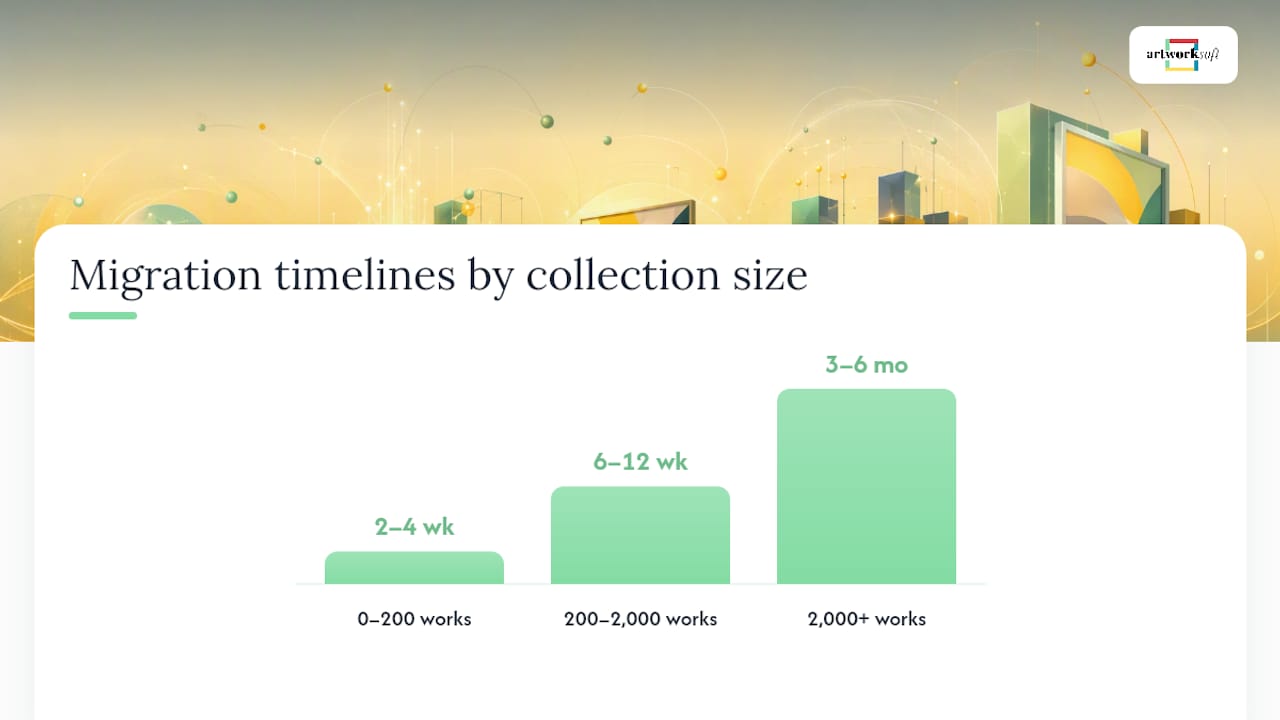
| Budget for onboarding | Migration timelines run 2–4 weeks for small collections and 3–6 months for 2,000+ works; factor setup time into the ROI model. |
| Artworksoft as a starting point | Artworksoft’s free plan, structured valuation formula, and PDF generation tools let galleries and collectors validate core workflows before committing to a paid tier. |
What does art collection management software actually do?
Art collection management software centralizes every record tied to a physical or digital artwork: inventory, documentation, valuation, provenance, movement, and transactions. Galleries and museums are shifting from paper cards and spreadsheets to cloud databases that consolidate all of this in one auditable system.
Core modules in a mature platform include:
- Artwork records: title, artist, medium, dimensions, edition details
- Images and documents: high-res photos, condition reports, appraisals
- Provenance chain: acquisition history, prior ownership, exhibition records
- Loans and shipping: movement logs, courier details, return dates
- Sales and invoicing: transaction history, buyer records, commission splits
- Valuation fields: purchase price, current estimate, insurance value
The use-case split is straightforward. A gallery registrar needs inventory reconciliation and loan tracking. A private collector needs provenance documentation and insurance-ready valuations. A working artist needs a catalog that generates Certificates of Authenticity and tracks where each piece is located at any given time.
What features must any art management system include?
Use this checklist when trialing any vendor. Missing items are negotiating points, not acceptable gaps.
Mandatory data fields:
- Title, artist name, date of creation
- Medium and materials
- Dimensions (framed and unframed)
- Provenance chain with dated entries
- Purchase history and tax invoices
- Insurance value and appraisal records
- Condition reports with dated photos
- High-resolution image hosting
- Document attachments (PDFs, certificates)
- Current location status
- Movement history log
- Full transaction history
Operational features to require:
- Role-based access and permission tiers
- Audit logs with timestamps
- Mobile access (iOS and Android)
- API integrations with accounting and marketplace platforms
- PDF generation for Certificates of Authenticity and invoices
- Search, filter, and tagging tools
- Bulk import and export (CSV, Excel)
- Multi-currency support
A well-structured catalog also requires exportable records and API-driven sync to prevent oversells and data fragmentation across systems.
Pro Tip: Before signing any contract, confirm in writing that you own your raw data, that full CSV/JSON export is available on demand, and that the vendor’s SLA specifies backup frequency and recovery time objectives. Vendors who resist these terms are a risk.
How does software change daily workflows for galleries, collectors, and artists?
The shift from manual tracking to cloud-based management produces measurable workflow changes for each user type.
Gallery registrar. Before: acquisition paperwork filed in folders, condition reports on paper, location tracked in a shared spreadsheet updated manually. After: each acquisition triggers a digital record with provenance fields, condition photos attached at intake, and location status updated in real time as works move between storage, the gallery floor, and loan destinations. Gallery ERP integrations connect inventory, accounting, and location tracking so each sale automatically updates financials and inventory simultaneously.

Private collector. Before: valuations in a binder, insurance certificates scattered across email threads, no single view of the collection’s total insured value. After: a dashboard showing current valuations, insurer-ready condition reports, and a provenance chain that satisfies estate attorneys and IRS documentation standards.
Working artist. Before: tracking consignment locations in a notebook, generating invoices manually, losing track of which galleries hold which pieces. After: a live location log for every work, automated Certificate of Authenticity generation at point of sale, and a portfolio view that supports building an online presence and remote collection updates from any device.
The risk-reduction outcome across all three personas is the same: fewer oversells, cleaner provenance records, and documentation that holds up under scrutiny.
How Artworksoft maps to the mandatory feature checklist
Artworksoft covers the full checklist above through a set of documented capabilities:
- AI-assisted valuation formula that applies a structured methodology to each artwork, replacing ad hoc pricing with a defensible, repeatable process
- Professional PDF generation for Certificates of Authenticity, invoices, and condition reports that meet insurer and IRS standards
- Movement and location tracking updated in real time as works move between storage, exhibitions, and loan destinations
- Analytics dashboards showing collection value, sales performance, and portfolio composition
- Client sharing tools that let galleries present curated views to collectors without exposing the full inventory
A typical workflow runs in three phases. During onboarding, existing records are imported via CSV and mapped to Artworksoft’s artwork profile fields. Daily use covers condition report entry, location updates, and invoice generation. Each month, the platform produces valuation summaries and insurance-ready exports that require no manual reformatting.
How to migrate from paper or spreadsheets: a step-by-step checklist
- Audit current records. Identify every artwork, document, and photo in your existing system, however informal.
- Clean your spreadsheet. Standardize field names, remove duplicates, and flag missing provenance data before import.
- Establish photo standards. Capture front, back, detail, and signature shots at a minimum of 2,000px on the long edge. Follow digital archiving best practices for file naming and metadata.
- Bulk import. Use the platform’s CSV import tool to load artwork records. Map columns carefully before committing.
- Set up user roles. Assign permissions before staff access the live system.
- Run a pilot. Select 20–50 works to test workflows end to end before full go-live.
- Train staff. Focus on the three highest-frequency tasks: record lookup, condition report entry, and invoice generation.
- Go live and audit. After 30 days, reconcile the digital inventory against physical stock.
Realistic timelines by collection size:
- 0–200 works: 2–4 weeks from audit to go-live
- 200–2,000 works: 6–12 weeks, depending on photo backlog
- 2,000+ works: 3–6 months with phased imports and dedicated data review
Pro Tip: Batch photos by location before import day. A consistent file-naming convention (ArtistLastName_Title_Year_View.jpg) prevents duplicate uploads and speeds up provenance tagging during QA.
What should you budget, and what ROI can you expect?
Art collection management software typically follows one of two pricing shapes, as Observer’s reporting on the market confirms: lower-cost plans for individuals and small collections, and enterprise quotes for galleries requiring deep integrations and dedicated support.
| Tier | Typical scope | Common cost drivers |
|---|---|---|
| Individual / free | Up to a defined artwork count, core fields, basic PDF output | Storage limits, branded PDF add-ons |
| Professional | Unlimited artworks, full PDF suite, analytics, integrations | Per-user seat fees, API access |
| Enterprise / gallery | White-label branding, onboarding services, SLA, dedicated support | Setup fees, training hours, SLA tier |
A simple ROI model for a mid-size gallery: if a registrar spends significant time each week on manual record reconciliation at an effective labor cost, subscribing to professional-tier software can reduce reconciliation time substantially and shorten the payback period, before accounting for avoided errors, faster sales cycles, and insurer-ready documentation.
Additional ROI drivers include reduced oversells, faster loan processing, and automated accounting entries that eliminate manual bookkeeping steps.
What security questions should you ask every vendor?
Security due diligence is not optional when collection records carry insurance and tax implications. Ask every vendor to answer these in writing:
- Backup frequency and retention: daily backups with at least 30-day retention is a reasonable floor
- Encryption: data encrypted at rest (AES-256 or equivalent) and in transit (TLS 1.2+)
- Role-based access: granular permissions so staff see only what their role requires
- Audit logs: timestamped logs of every record change, accessible to administrators
- Disaster recovery: documented RTO (recovery time objective) and tested restore procedures
- Compliance frameworks: ask whether the vendor holds SOC 2 Type II or ISO 27001 certification, and request the most recent audit summary
Common failure modes include system downtime during art fair periods, import errors that corrupt provenance fields, and human error on permission assignments that expose sensitive pricing data. Each has a mitigation: scheduled maintenance windows, pre-import QA checklists, and quarterly access reviews.
Insurers increasingly ask for documented provenance records and audit logs as evidence in claims. A system that cannot produce a timestamped change history is a liability, not an asset.
A mid-size gallery migration: what the outcome looks like
A gallery managing approximately 400 works across two locations moved from a shared spreadsheet and paper condition reports to a cloud-based system over eight weeks. The migration followed the checklist above: a two-week audit and spreadsheet cleanup, three weeks of phased bulk import with photo batching, and a three-week pilot before full go-live.
Outcomes after 90 days of live operation:
- Inventory reconciliation time dropped from a full day per month to under two hours
- Sales cycle documentation (invoice, Certificate of Authenticity, condition report) reduced from 45 minutes per transaction to under 10 minutes
- Zero oversells in the 90-day period, compared to two in the prior quarter
- Insurance renewal completed with no supplemental documentation requests from the insurer
Why documentation and valuation were the starting point
The decision to build Artworksoft around documentation and valuation first, rather than CRM or marketing features, reflects a clear priority: a collection that cannot be documented cannot be protected, sold, or insured at fair value. Provenance gaps cost collectors money at auction. Missing condition reports delay insurance claims. Unstructured pricing undermines negotiating confidence.
Artworksoft’s structured valuation formula and PDF generation tools address those gaps directly. If you are preparing for a demo, bring a CSV of your current inventory, a sample of your existing condition reports, and a list of the user roles you need to configure. That is enough to run a complete pilot in the first session.
Artworksoft gives you a documented, auditable collection from day one
Artworksoft offers a free plan to trial core inventory and documentation features before committing to a paid tier. The professional tier adds unlimited artworks, the full PDF suite (Certificates of Authenticity, invoices, condition reports), analytics dashboards, and client sharing tools.

For galleries and collectors preparing a demo, the practical next steps are straightforward: export your current inventory to CSV, gather a sample photo batch, and identify the two or three workflows you need to validate (valuation, loan tracking, or sales documentation). Artworksoft’s art gallery services and onboarding team can map those workflows to the platform in a single session.
Start with the free tier or review the full documentation feature set before your first call. Both pages give you the specific field lists and PDF output samples you need to run an informed evaluation.
Sources
- How Gallery and Museum Collections Management Went Digital | Observer
- Gallery ERP Software | NetSuite











