


The most effective way to manage multiple art series workflow is to maintain a single source-of-truth inventory with series-level records, standardized artwork IDs, and integrated movement and transaction logging. Start today by creating a master file, selecting an ID pattern, enabling a Series field in your database, and photographing every work at baseline condition.
Immediate actions:
- Create one master inventory file as the canonical record for all series
- Adopt a structured ID pattern (format: YYYY-SERIECODE-###)
- Enable a dedicated Series field in your collection database from day one
- Photograph each work at intake and link image file IDs to the artwork record
A single master inventory acts as the authoritative source of truth. Artworksoft maps directly to this structure with built-in series records, movement logging, and art inventory management.
Key Takeaways
A single source-of-truth inventory with standardized IDs, series-level records, and integrated movement and transaction logging is the foundation of any reliable multi-series art management workflow.
| Point | Details |
|---|---|
| One master inventory | Maintain one canonical file with backups on two media types and one off-site copy. |
| Standardized Artwork IDs | Use a YYYY-SERIECODE-### pattern from day one; never change an ID after a record is published. |
| Series-level metadata | Separate series fields (rights, theme, dates) from work-level fields (edition, condition, location) to enable accurate bulk updates. |
| Valuation with traceable inputs | Apply the Base × Edition Adjustment × Condition Multiplier + Documentation Premium formula and save a timestamped snapshot at each revision. |
| Artworksoft for end-to-end management | Artworksoft maps series records, COA generation, movement logging, and transaction tracking into one connected platform with a free entry point. |
What does a practical weekly workflow look like for managing multiple series?
A seven-step checklist covers the full cycle for a 1–3 person operation or gallery team.
- Create series records. Open your art management system and add a record for each series: title, start date, theme, and rights holder.
- Add artwork profiles. Under each series, create individual artwork records with Artwork ID, title, medium, dimensions, and edition number.
- Capture metadata. Complete all controlled-vocabulary fields (status, location type, condition state) using dropdowns to prevent free-text errors.
- Photograph. Shoot front, back, detail, and signature views. Store the high-resolution original and a web-sized derivative; record both file IDs in the artwork record.
- Set valuations. Apply the formula (see Section 4) and record all inputs and comparables in the valuation field.
- Log the first movement event. Record the artwork’s current location as the opening entry in the movement log.
- Establish a reporting cadence. Schedule a monthly export of the series summary report and a quarterly full inventory audit.
Quick-start checklist for galleries and small studios:
- Confirm one person owns the master file
- Agree on the ID pattern before entering any records
- Set up dropdowns for Status, Location, and Condition before cataloguing begins
- Complete at least one series end-to-end as a pilot before migrating all records
Pro Tip: Choose your Catalog ID granularity before entering a single record. A pattern combining year, series code, and sequence number scales well to large numbers of works without collision. Changing the pattern mid-catalog forces a full re-key.
What metadata schema and naming conventions keep series data consistent?
Separate fields into two tiers: series-level and work-level. Mixing them in a single flat record makes bulk updates error-prone and reporting unreliable.
Series-level fields
| Field | Description |
|---|---|
| Series Title | Official name; avoid symbols for web display |
| Series Code | Short alphanumeric code used in Artwork IDs |
| Start Date / End Date | Production period |
| Theme / Subject | Controlled vocabulary term |
| Rights Holder | Legal entity holding copyright |
| License Type | Dropdown: All Rights Reserved, CC BY, CC BY-NC, Licensed |
Artwork-level fields
| Field | Description |
|---|---|
| Artwork ID | YYYY-SERIECODE-### (e.g., 2025-LAND-001) |
| Title | Work title |
| Medium | Controlled vocabulary (Oil on Canvas, Archival Pigment Print, etc.) |
| Dimensions (in) | H × W × D in inches |
| Edition Number | e.g., 3/10 |
| Status | Dropdown: Available, On Loan, Sold, Reserved, In Storage |
| Current Location | Dropdown linked to location records |
| Condition State | Dropdown: Excellent, Good, Fair, Poor |
| Image File IDs | High-res filename + web derivative filename |

A structured ID pattern combining year, series code, and sequence number prevents mix-ups and makes searching reliable across large catalogs. A Series field in your collection database supports both single-record edits and bulk updates, which becomes critical when reassigning dozens of works at once.
Controlled vocabularies to enforce via dropdowns:
- Status: Available, On Loan, Sold, Reserved, In Storage, Deaccessioned
- Location types: Gallery, Storage, Private Collection, Museum Loan, Transit
- Condition states: Excellent, Good, Fair, Poor
- Rights/license types: All Rights Reserved, CC BY, CC BY-NC, Licensed, Public Domain
How do you value artworks within a series consistently?
Formula: Base Price (comparable sales) × Edition Adjustment × Condition Multiplier + Documentation Premium + Gallery/Commission Factor = Final Valuation
Each component has a defined input source:
- Base Price: Median of three recent comparable sales at auction or gallery
- Edition Adjustment: Divide base by edition size, then apply a scarcity factor (e.g., 1.15 for editions of 5 or fewer)
- Condition Multiplier: Excellent = 1.0; Good = 0.90; Fair = 0.75 (see condition impact on valuation)
- Documentation Premium: Add 5–10% when a COA, provenance chain, and condition report are on file
- Gallery/Commission Factor: Add the gallery’s commission rate to arrive at the retail price
Worked example:
| Component | Value |
|---|---|
| Base Price (comparable) | $4,000 |
| Edition Adjustment (×1.15, edition of 5) | $4,600 |
| Condition Multiplier (Good, ×0.90) | $4,140 |
| Documentation Premium (+8%) | $4,471 |
| Gallery Commission (+50%) | $6,707 |
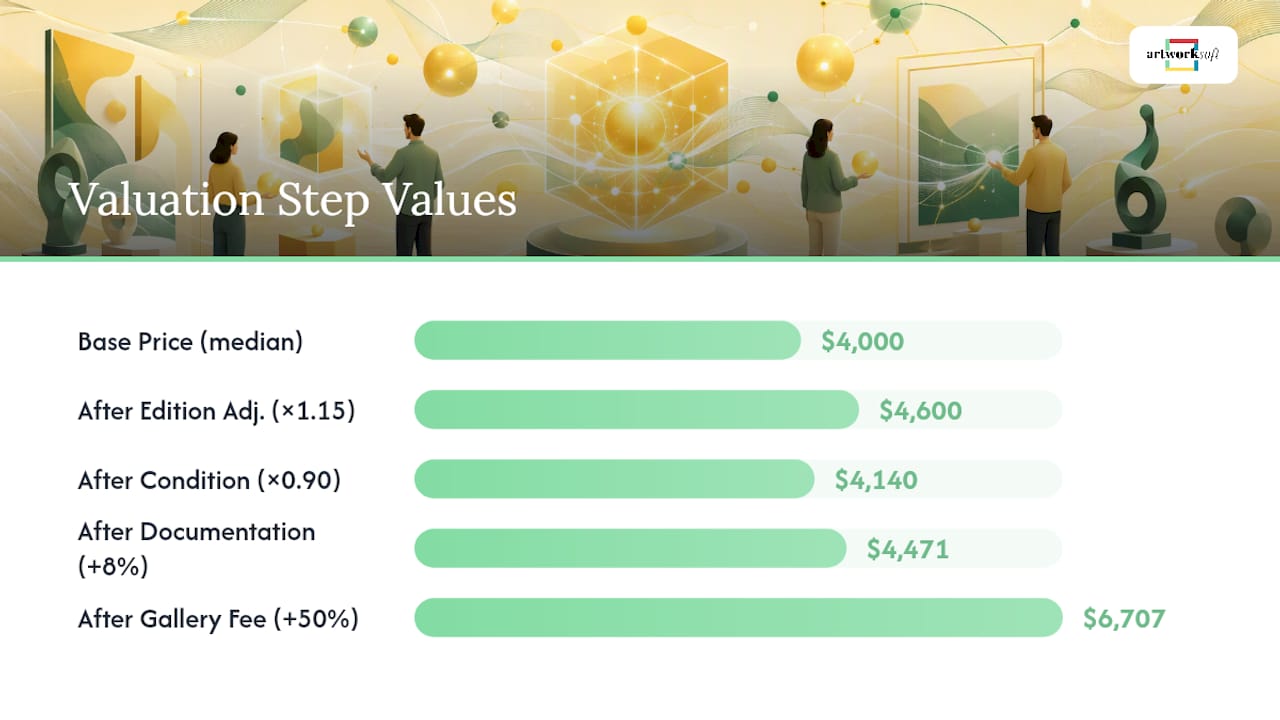
Record comparables, sources, and the date of each valuation in the artwork record so buyers, insurers, and auditors can trace every assumption. Artworksoft’s art valuation methods feature stores these inputs alongside the artwork profile.
Pro Tip: Save a named “Valuation Snapshot” each time you revise a price. A timestamped history of inputs is far more persuasive to an insurer than a single current figure with no context.
What documentation does every series and artwork need?
Certificate of Authenticity checklist:
- Artist’s full legal name and signature
- Artwork title, date, medium, and dimensions
- Edition number and total edition size
- Artwork ID (matching the inventory record)
- Brief provenance statement
- Artist or gallery stamp/seal
Condition report checklist:
- Artwork ID and title
- Date of inspection and inspector name
- Overall condition rating (from controlled vocabulary)
- Detailed description of any damage, repairs, or aging
- Front, back, and detail photographs with file IDs
- Storage and handling recommendations
Photo specifications:
- Resolution: minimum 300 DPI at full print size; archival master at 600 DPI
- Color profile: Adobe RGB (1998) for archival; sRGB for web derivatives
- File naming: YYYY-SERIECODE-###_FRONT.tif (archival), YYYY-SERIECODE-###_FRONT_web.jpg (derivative)
- Storage: cloud primary + local backup + off-site copy
Treat photographic documentation as a versioned asset: store the original high-resolution file and a standardized web-sized derivative, and record both file IDs in the artwork record. Artworksoft’s digital documentation tools generate COAs and condition reports as professional PDFs linked directly to each artwork profile.
How do you track movement, loans, and transactions for a complete chain of custody?
Every physical transfer requires a movement event record. Every financial exchange requires a transaction record. Keeping them separate but linked to the same Artwork ID preserves a clean audit trail.
Movement event fields to capture:
- Artwork ID
- Date of departure and date of arrival
- Origin location and destination location
- Courier or transport company name
- Condition state on departure (with inspector name)
- Condition state on arrival (with inspector name)
- Insurance certificate number and coverage value
Transaction record fields:
- Invoice number
- Buyer name and contact
- Seller name (gallery or artist)
- Sale price, commission amount, net proceeds
- Payment status: Paid, Partial, Pending
- Transfer of ownership date
- Related movement event ID
Artworksoft’s movement and logistics module and sales and transactions feature log both event types and link them to the artwork record automatically.
Pro Tip: Combine the condition check with an insurance notification at every movement event. A condition discrepancy discovered on arrival is far easier to claim when the departure condition is already on file with the insurer.
What user roles, permissions, and backup practices protect collection data?
Recommended role structure:
- Admin: Full read/write access, user management, export, delete
- Curator: Read/write on artwork records and series; no user management or delete
- Cataloguer: Add and edit artwork records; no financial data or delete
- Finance: Read/write on transaction records; read-only on artwork records
- Viewer: Read-only access; can use secure sharing links for client presentations
Audit-trail checklist:
- Log every field-level change with user ID, timestamp, and previous value
- Retain change history for a minimum of seven years for insurance and legal purposes
- Flag deletions as soft-deletes (archived, not permanently removed) until an Admin confirms
Backup and security checklist:
- Maintain at least three copies: one master, one cloud backup, one off-site or local copy
- Use two different storage media or services for redundancy
- Restrict export permissions to Admin and Finance roles
- Enable two-factor authentication for all user accounts
How do batch imports, templates, and automation help you scale across many series?
A structured spreadsheet template covering Catalog ID, Image URL, Title, Artist, Year, Medium, Dimensions, Location, Status, Purchase Price, Sale Price, Buyer, and Notes is a practical starting point. Start with a standardized template and migrate to automation once naming rules and dropdowns are stable.
Bulk-import column mapping (required fields for CSV/Excel import):
- Artwork ID (must match the ID pattern exactly)
- Series Code (must match an existing series record)
- Title
- Artist
- Year Created
- Medium
- Dimensions
- Status (must match dropdown vocabulary)
- Current Location (must match location record)
- Image URL or file path
Templates to maintain:
- Series record template (pre-filled series-level fields)
- COA template (PDF generator with merge fields)
- Condition report template
- Export template for insurance reporting
- Export template for exhibition loan lists
Pro Tip: Attach a QR code label to every physical work that encodes its Artwork ID. Scanning the label during a physical audit instantly pulls up the digital record, eliminating manual look-ups and transcription errors. Pre-sorting physical labels by series before an audit, much like pre-sorting materials by category before a complex project, cuts reconciliation time significantly.
What does a realistic implementation timeline and cost plan look like?
| Phase | Duration | Key Activities |
|---|---|---|
| Pilot | Weeks 1–4 | Select 1–2 series (50–200 records); test imports, COA generation, and valuation traceability |
| Onboard and Catalogue | Weeks 5 and onwards | Migrate remaining series; train all roles; establish reporting cadence |
| Full Roll-Out | Weeks from the fifth onward | Activate automation rules; run quarterly audits; expand to new series as acquired |
Typical cost categories:
- Software subscription: tiered SaaS fee (Artworksoft offers a free plan entry point)
- Data entry labor: estimated at a typical amount of time per artwork record for a trained cataloguer
- Photography: professional art photography per work or session (costs vary)
- Migration or onboarding fees: one-time setup support for large collections
Pilot-scope checklist:
- Select 1–2 series with 50–200 records total
- Assign one Admin and one Cataloguer for the pilot
- Require at least one full COA, one movement event, and one transaction record as acceptance criteria
- Export a series summary report and an insurance report before sign-off
Run a small pilot batch when migrating to any platform; use it to test imports, templates, and valuation traceability before committing the full collection.
How does a series map into Artworksoft step by step?
The following walkthrough uses a hypothetical series, “Coastal Light 2025,” with ten editioned prints.
- Step 1 — Create the series record. In Artworksoft, open the Series module, enter “Coastal Light 2025” as the series title, assign the series code COAST, and set the rights holder and license type.
- Step 2 — Add artwork profiles. Create ten artwork records under the series. Artworksoft’s artwork profile management pre-fills the series code into each Artwork ID (e.g., 2025-COAST-001 through 2025-COAST-010).
- Step 3 — Upload images. Attach the high-resolution archival TIFF and the web JPEG to each profile. Artworksoft stores both and records file IDs automatically.
- Step 4 — Issue a COA. Select the artwork record, choose “Generate COA,” and the platform produces a branded PDF with all required fields pre-populated.
- Step 5 — Log a loan. Open the movement log, enter the departure location, destination (e.g., “Harbor Gallery, Boston”), courier details, and condition state. Artworksoft links the event to the artwork record.
- Step 6 — Record a sale. In the transactions module, enter the invoice number, buyer details, sale price, commission, and transfer date. Status updates to Sold automatically.
Recommended export folder structure:
/Coastal-Light-2025/
  /COAs/
  /Condition-Reports/
  /Images/Archival/
  /Images/Web/
  /Transaction-Records/
  /Movement-Logs/
Pro Tip: Name every exported PDF using the Artwork ID as the prefix (e.g., 2025-COAST-001_COA.pdf). This makes folder searches instant and prevents version confusion when a COA is reissued.
How do you integrate series management with existing gallery systems?
The core principle is single-record authority: one system holds the canonical artwork record, and all other tools read from or write to it. Avoid maintaining parallel records in a gallery website CMS and a separate inventory tool without a defined sync rule.
Practical integration steps:
- Map field names between systems before any data transfer (e.g., confirm that “Medium” in the gallery CMS matches “Medium” in the inventory database)
- Use CSV exports on a defined schedule (weekly or after each significant event) rather than real-time sync until both systems are stable
- Assign one person as the integration owner responsible for reconciling discrepancies
- For web-facing series pages, follow naming guidance that avoids special characters and symbols, which can break display on artist or gallery pages
Museum-grade collection management standards provide a useful benchmark for field definitions and data governance that scales across multiple systems.
How should you handle rights management and licensing across multiple series?
Rights management belongs at the series level in the metadata schema, not only at the work level. A series created under a commission agreement may carry different reproduction rights than an open-edition series sold directly.
Key practices:
- Record the rights holder, license type, and any territorial restrictions in the series record
- Note expiration dates for time-limited licenses in a dedicated field with an alert or review date
- For editioned works, specify whether the edition includes digital reproduction rights or print-only rights
- Maintain a rights register separate from the sales record so ownership transfer does not automatically transfer reproduction rights unless explicitly documented
- When licensing images for publication, log the licensee, usage scope, fee, and term in the transaction record linked to the artwork
Authentication documentation directly affects licensing value. Well-documented provenance and a COA on file support higher licensing fees and reduce disputes. See how authentication affects artwork price for a detailed breakdown.
How do you coordinate collaborative projects across multiple artists and series?
Collaborative series introduce a permissions challenge: each contributing artist may need access to their own records without visibility into another artist’s pricing or buyer data.
Effective coordination strategies:
- Assign each contributing artist a Viewer or Cataloguer role scoped to their own series records only
- Use a shared series record for collaborative works, with a “Primary Artist” field and a “Contributing Artists” field listing all collaborators
- Define credit and rights splits in the series record before cataloguing begins; document the agreed percentage in the rights field
- Schedule a joint review at each exhibition milestone so all contributors confirm condition reports and movement events
- For multi-artist exhibitions, generate a consolidated series export that lists all contributing artists without exposing individual pricing to other participants
Artwork management services can support larger collaborative projects where cataloguing volume or complexity exceeds in-house capacity.
What the conventional wisdom on art series management gets wrong
Most guides treat series management as a cataloguing problem. The real challenge is governance: who owns the record, who can change it, and what happens when two people update the same field from different locations.
Galleries that invest heavily in metadata schemas but skip role definitions and audit trails end up with accurate records that no one trusts, because there is no way to know who changed a valuation or moved a status to Sold. The schema is the easy part. The harder discipline is deciding, before the first record is entered, that one system is authoritative and one person is accountable for each data type.
Two tips worth applying beyond any checklist: First, lock the Artwork ID field from editing the moment a record is published. An ID that changes mid-life breaks every linked document, movement log, and transaction record attached to it. Second, schedule a quarterly “dead record” audit to identify works that have no movement event, no valuation update, and no image on file. These gaps are where provenance disputes originate.
Artworksoft covers every step of this workflow
Managing multiple series at gallery or collector scale requires a platform that connects inventory, documentation, valuation, and transactions in one place. Artworksoft delivers exactly that: a master inventory with series-level records, AI-assisted valuation with traceable inputs, automated COA and condition-report generation, movement and loan logging, and role-based access with audit trails.

The free plan gives galleries and collectors a working inventory from day one, with no migration fee required for smaller collections. Paid tiers add branded documentation, advanced analytics, and white-label reporting for professional client presentations. Onboarding support is available for larger multi-series migrations.
Start with a free account at Artworksoft or book a demo to see the series workflow mapped to your collection.
Sources
- How to Create an Artwork Inventory: A Step-by-Step Guide - FromLight2Art
- How to Build Art Inventory in Google Sheets & Excel











