


To manage a collection effectively, start with a single Pass-1 identity sweep: record what each item is, where it is, and who owns or donated it. That baseline, built in a spreadsheet or a purpose-built catalog system, is the foundation every other workflow depends on.
Three actions you can take in the next 60 minutes:
- Start a Pass-1 sweep. Open a spreadsheet and log each item’s name, a unique identifier (accession number, UUID, or ISBN), and its current location. Capture only identity fields for now.
- Set a naming rule. Decide on one consistent format before you add a second record. A simple pattern such as Collection Code + Year + Short Title works for most contexts.
- Store a backup. Copy the file to a cloud folder (Google Drive, OneDrive, or Dropbox) immediately. Off-site copies protect against hardware failure from day one.
Tools to use right now: a spreadsheet (Google Sheets or Microsoft Excel), a basic collection management system (CMS), or a purpose-built platform like Artworksoft for art-specific records. Any of these gets you operational faster than waiting for the perfect system.
Key Takeaways
A well-managed collection depends on three disciplines applied consistently: accurate identity records at intake, a structured location schema updated at every move, and a governance policy that names who is responsible for each decision.
| Point | Details |
|---|---|
| Start with a Pass-1 sweep | Record name, unique identifier, and location for every item before adding any other metadata. |
| Use persistent unique identifiers | Assign accession numbers, UUIDs, or ISBNs at intake and never reuse or reassign them. |
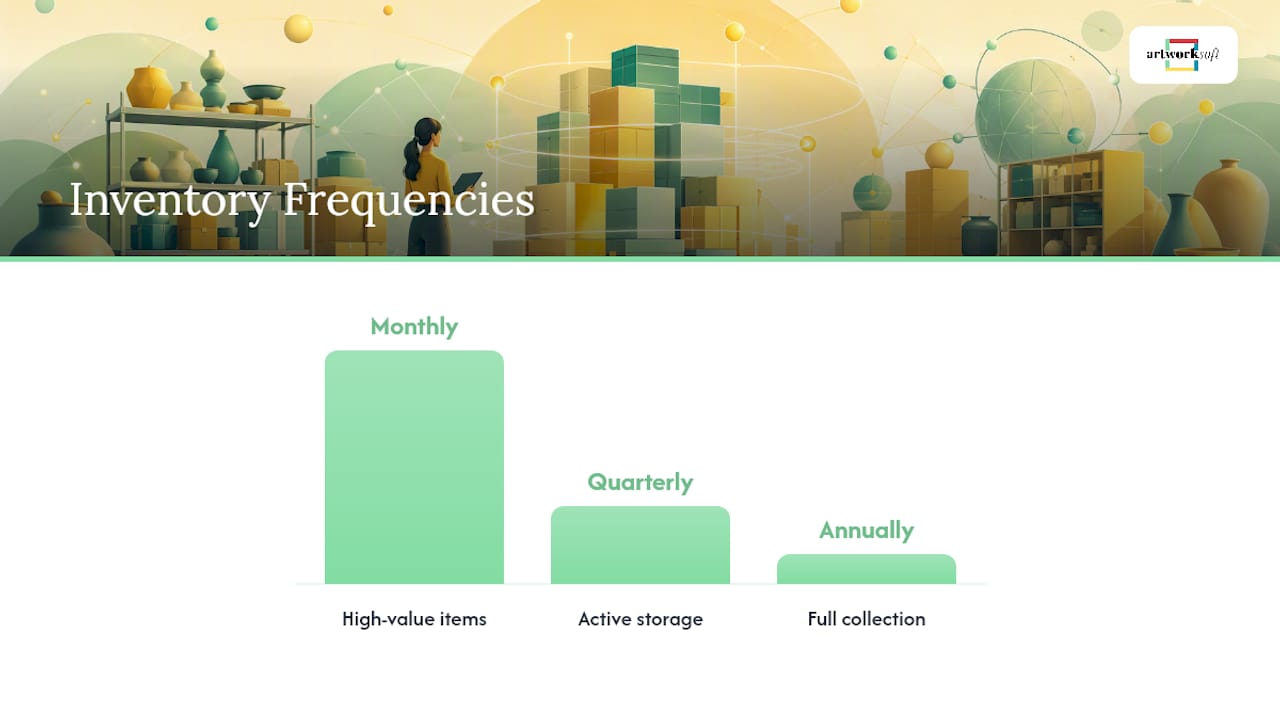
| Run inventories on a schedule | Monthly for high-value items, quarterly for active storage, annually for the full collection. |
| Separate policy from procedure | Policy states what and why; procedure names how, when, and who, following Collections Trust guidance. |
| Artworksoft for art collections | Artworksoft maps provenance, location, permissions, exports, and documentation to a single platform. |
How do you create, edit, move, and delete collections?
Every collection management system, whether a museum catalog, a software platform, or a configuration manager, shares the same core lifecycle actions. Understanding them in sequence prevents data loss and keeps your hierarchy clean.
Creating a top-level collection requires setting four fields at minimum: a unique collection name, a collection code or identifier, a description, and an access/permission level. Sub-collections inherit the parent’s identifier as a prefix (e.g., ART-2024 becomes ART-2024-PRINTS), which keeps the hierarchy readable at a glance.
Promoting a sub-collection to top-level is appropriate when a sub-collection grows large enough to stand independently or when its parent is being retired. Before promoting, export the sub-collection’s membership list, update all cross-references in related records, and assign a new top-level code. Reparenting without updating references is the most common cause of orphaned records.
Moving and reordering collections safely requires three steps: preview the affected items, lock the collection to prevent concurrent edits, and confirm the audit trail captures the move. Microsoft’s Configuration Manager documentation lists these core admin actions explicitly, including membership synchronization and export, as standard operations any collection administrator should be able to perform.
Deleting a collection should always follow this sequence: export the full member list, check for dependent records or linked transactions, archive rather than hard-delete where the system allows it, and document the reason in the change log.
Pro Tip: When reparenting or renaming a collection, update the naming convention in the same transaction. A collection renamed without updating its code creates a silent mismatch that surfaces only during audits.
How should you design a hierarchy and naming system that scales?
Structure is the decision that determines whether a collection stays manageable at 50 items or becomes unworkable at 500. The right hierarchy depends on how the collection will be used, not on how it was acquired.
Four organizing principles to choose from:
- By object type: Groups similar items together (paintings, prints, sculptures). Best for collections where type-based retrieval is the primary use case.
- By provenance or donor: Organizes items by their origin or acquisition source. Preferred by archives and institutions following the NPS Museum Handbook documentation standards.
- By project or exhibition: Useful for working collections where items move in and out of active use.
- By use-case or audience: Appropriate for digital asset libraries or lending collections where access rights vary by group.
Pick one primary logic and apply it consistently. Mixing two organizing principles in the same hierarchy creates ambiguity that compounds with every new acquisition.
Naming convention pattern: [Collection Code]-[Year]-[Short Title]-[Version]. For example, SCU-2023-BronzeStudies-v2 is unambiguous, sortable, and self-documenting. Keep short titles under 20 characters and avoid special characters that break file systems or database queries.
Identifier strategy: Assign persistent, unique identifiers at the point of entry. Accession numbers work for physical collections; UUIDs suit digital assets; ISBNs apply to published works. Museums Galleries Scotland recommends recording unique identifiers and locations consistently as a baseline practice for any institution managing collections.
Limit metadata fields to those you will actually maintain. A catalog with 40 fields, half of them empty, is harder to use than one with 12 complete fields. Start with identity, location, condition, and provenance. Add fields only when a documented operational need arises.
How do you add, update, and maintain items inside a collection?
Item-level operations are where most data quality problems originate. A structured workflow prevents gaps from accumulating and keeps provenance intact.
Three-pass cataloging workflow (adapted from Ardent Workshop’s cataloging method):
- Pass 1: Identity sweep. Record the item’s name, unique identifier, and current location. Nothing else. Complete this pass for every item before moving to Pass 2. A minimal-first approach dramatically increases completion rates and creates a usable baseline.
- Pass 2: Enrichment. Add provenance (donor name, date acquired, purchase price or estimated value), condition notes, multiple titles or names if applicable, and supporting images. The State Historical Society of Iowa’s guidance stresses capturing the “what, who, and where” for every donation: object names, donor details, and consistent locations.
- Pass 3: Maintenance rules. Set a review schedule for each item or category. Flag items that need condition reassessment, insurance revaluation, or location verification. This pass converts a static catalog into a living record.
Checklists for key item workflows:
Incoming donation:
- Assign a temporary receipt number before the item enters the building.
- Record donor name, contact, and any conditions attached to the gift.
- Note condition on arrival with photographs.
- Issue a formal deed of gift or deposit agreement.
Loan out:
- Confirm borrower’s insurance coverage and facility standards.
- Complete a condition report before the item leaves.
- Log the expected return date and location during the loan period.
- Update location record to reflect the borrower’s address.
Deaccession:
- Confirm the item is within the collection development policy’s scope for disposal.
- Document the reason and method (sale, transfer, destruction).
- Remove the item from the active catalog and archive the record.
- Record the final disposition date and recipient.
Pro Tip: Photograph every item against a neutral background before it moves anywhere. Attach the image directly to the catalog record at the time of photography. Retroactive image matching is time-consuming and error-prone, especially for items that look similar.
What roles and permissions should control your collection?
Access control is not just a security measure. It is the mechanism that makes delegation safe and audits meaningful. A well-designed permission model lets the right people act without requiring administrator involvement for routine tasks.
Typical role model for collection management:
Owners and admins hold full control, including the ability to delete collections and export sensitive data. Managers can build and edit but cannot destroy records. Contributors add and update items. Viewers access records without modifying them.
Protecting critical actions: Delete and export permissions carry the highest risk. Restrict delete to admins only. Require a second confirmation step (a typed collection name or a supervisor approval) before any bulk delete executes. Export permissions should be logged, not blocked, so the audit trail captures who pulled data and when.
Audit trails record every create, edit, move, and delete action with a timestamp and user ID. They serve two functions: recovery (reversing an accidental change) and accountability (demonstrating compliance during an external review). A collection without an audit trail cannot be trusted after a staff change.
Pro Tip: Apply the least-privilege principle to contractors and temporary staff. Grant access to the specific sub-collection they need, set an expiry date on the permission, and revoke it on the day their engagement ends. Never leave temporary access open indefinitely.
How do you track locations and run inventories accurately?
Location data degrades faster than any other field in a catalog. Items move for exhibitions, loans, conservation, and storage reorganizations. Without a structured location schema and a regular inventory schedule, the catalog and the physical collection drift apart.

Suggested location schema: Building > Room > Cabinet > Shelf/Box. For example: Main Gallery > Storage Room B > Cabinet 3 > Shelf 2. Label every physical location with a code that matches the catalog exactly. A label that reads MG-SRB-C3-S2 is unambiguous and scannable.
Inventory schedule recommendations:
- Monthly: High-value or high-risk items (works on loan, items under insurance review, recently acquired pieces).
- Quarterly: Active storage areas and items that move frequently.
- Annually: Full collection inventory, reconciling every catalog record against the physical location.
The NPS Museum Handbook provides detailed guidance on inventory planning and documentation standards that support these cadences for both small and large institutions.
Recording moves and chain of custody: Every time an item moves, log the date, the person authorizing the move, the origin location, and the destination. For temporary exhibition placements, record the expected return date and the borrowing party’s contact. This chain-of-custody record is the evidence trail that satisfies insurance requirements and supports loan agreements.
Standard to follow: The Absolute Basics of Collection Management guidance recommends planning inventories and recording donor information at the point of deposit, not retrospectively. Capturing location at intake prevents the backlog that makes later reconciliation so costly.
Reconciliation check: During each inventory cycle, compare the physical count against the catalog. Flag discrepancies immediately: items present but not cataloged, items cataloged but not found, and items in the wrong location. Resolve each flag before closing the inventory cycle.
How do you export data, generate reports, and protect collection records?
Exports and reports are the operational output of a well-managed collection. They serve audits, insurance claims, grant applications, and disaster recovery equally.
Common export formats and when to use them:
- CSV: Best for spreadsheet analysis, bulk imports into other systems, and sharing data with non-specialist staff.
- XML/METS: Preferred for digital preservation and interoperability with library and archive systems.
- PDF: Appropriate for human-readable reports, Certificates of Authenticity, and formal documentation sent to donors or insurers.
Recommended operational reports:
- Inventory discrepancy report (items flagged during reconciliation)
- Incoming donations log (items received within a defined period)
- Valuation summary (current estimated values by category or location)
- Movement log (all location changes within a defined period)
- Condition assessment report (items flagged for conservation review)
Backup best practices:
- Maintain at least three copies: one on the primary system, one on a local backup, and one off-site or in cloud storage.
- Schedule automated exports at least weekly for active collections.
- Test restoration from backup quarterly. A backup that has never been restored is an untested assumption.
- Before any bulk update or collection deletion, run a full export and store it with a date stamp.
Connecting to Collections recommends off-site backups and photographic documentation as baseline practices for institutions of any size, not just large museums.
How do you automate bulk operations without losing data integrity?
Automation reduces the manual effort of routine updates and membership-rule maintenance, but it introduces risk when applied without controls. The discipline is in the safety checklist, not the script.
When automation is appropriate:
- Routine membership-rule updates (adding all items that meet a defined criterion to a collection automatically).
- Scheduled inventory exports (daily or weekly snapshots sent to a backup location).
- Bulk condition-status updates (flagging all items past a review date as “due for assessment”).
- API-driven syncs between the collection catalog and a CRM, digital asset manager, or financial system.
Safety checklist for any bulk operation:
- Export the full affected collection before running the operation.
- Test the script or batch process in a staging environment with a sample of 10–20 records.
- Run the operation in staged batches, not all at once, so errors surface early.
- Confirm the audit log captured every change before closing the session.
- Keep the pre-operation export for at least 30 days as a rollback reference.
Microsoft’s Configuration Manager documentation covers PowerShell cmdlets for collection membership updates and batch operations, illustrating how automation and manual overrides coexist in a governed system. The same pattern applies to any platform that exposes an API or CLI: automate the routine, but preserve a manual override path for exceptions.
Combining automated rules with manual overrides: Set automated membership rules as the default, then allow designated managers to add or exclude individual items manually. Document every manual override in the item record so the reason is visible during audits.
Pro Tip: Never run a bulk delete or bulk reclassification on a Friday afternoon. Schedule high-risk bulk operations at the start of a working day when the full team is available to catch and reverse errors quickly.
What governance policies and procedures does a collection need?
Governance is the structure that keeps a collection manageable across staff changes, budget cycles, and institutional reviews. Without it, individual decisions accumulate into inconsistencies that take years to untangle.
The Collections Trust collections management framework defines the distinction clearly: policies state what the collection will do and why, while procedures specify how, when, and who. A policy that says “the collection will document all acquisitions” is incomplete without a procedure that names the form, the deadline, and the responsible staff member.
What a collections management policy should cover:
- Collection development: What types of items the collection will and will not accept.
- Documentation standards: Required fields, identifier formats, and image specifications.
- Access and use: Who may view, borrow, or reproduce items, and under what conditions.
- Care and storage: Environmental standards, handling procedures, and conservation priorities.
- Disposal and deaccession: Criteria and approval process for removing items from the collection.
- Review cycle: How often the policy itself is reviewed and by whom.
Ownership matrix for key decisions:
- Acquisitions: approved by the collection owner or director.
- Disposals: approved by the collection owner, with a written rationale on file.
- Annual audit: conducted by a designated manager, reviewed by the owner.
- Policy review: triggered every two years or after a significant collection change.
Pro Tip: Convert each policy statement into a one-page procedure document with a named responsible person and a completion deadline. A policy without a named owner is a statement of intent, not a governance control.
An internal audit should check three things: that every item in the catalog has a physical location on record, that every location in the schema has a corresponding catalog entry, and that the audit trail shows no unexplained gaps. Run this check annually at minimum, and after any bulk operation or staff transition.
How does Artworksoft map to these collection management tasks?
Purpose-built software closes the gap between policy and practice by embedding the workflows described above into a single interface. Artworksoft is designed specifically for art collections, which means its data model reflects the fields, relationships, and documentation types that art professionals actually need.
Feature-to-task mapping:
| Collection Task | Artworksoft Feature |
|---|---|
| Create/edit/delete records | Artwork profile management with full CRUD controls |
| Item metadata and provenance | Provenance fields, donor data, acquisition date, condition |
| Location tracking | Movement and logistics module with chain-of-custody logs |
| Exports and reports | CSV/PDF export, asset reports, valuation summaries |
| Permissions and access | Role-based access with tiered permission settings |
| Documentation generation | Certificates of Authenticity, invoices, professional PDFs |
| AI-assisted valuation | Structured valuation formula with portfolio analytics |
| Migration and backup | CSV import/export for data portability and off-site backup |
“A collection management system should make the right action the easiest action — logging a location, attaching an image, or generating a Certificate of Authenticity should take seconds, not minutes. When the system friction is low enough, staff actually use it, and the catalog stays current.” The workflows in this guide align with the SPECTRUM standard for museum collection procedures, the NPS Museum Handbook’s documentation and inventory guidance, and the Collections Trust framework for policy and procedure design.
Artworksoft’s digital documentation capabilities cover the full documentation lifecycle: photographing, attaching images to records, generating professional PDFs, and exporting data for insurance, loans, or audits. The platform’s CSV import/export supports migration from spreadsheets and provides the off-site backup path that best practices require. For institutions following museum-standard workflows, Artworksoft’s structure maps directly to SPECTRUM and NPS handbook procedures.
What a real backlog taught me about the 60-second rule
The most consistent finding across collection management practice is that backlogs form at the point of intake, not during maintenance. When a new item arrives and the cataloging step is deferred, it joins an undocumented queue that grows faster than any team can clear it. The fix is not a bigger cataloging sprint. It is a rule: every item gets a Pass-1 record within 60 seconds of intake. Name, identifier, location. Nothing more is required at that moment.
That single discipline, enforced consistently, keeps the catalog current and makes every subsequent enrichment pass faster. Donor stories, condition notes, and valuation data can wait. The identity record cannot.
Artworksoft gives collectors and galleries a ready-made system
Collectors, gallery owners, artists, and small institutions that need a structured way to document and manage their holdings can start with Artworksoft’s free plan and have a working catalog within a day. The platform handles the operational tasks this guide covers: artwork records with provenance fields, location and movement tracking, role-based permissions, professional PDF generation, and CSV export for backups and audits.

For art professionals who want to move beyond spreadsheets without building a custom system, Artworksoft provides the structure, the documentation tools, and the art inventory features that align with SPECTRUM, NPS, and Collections Trust standards. The free plan is available at Artworksoft. Sign up, import your existing records via CSV, and run your first inventory reconciliation the same day.
Sources
The standards and guides below form the authoritative basis for the workflows in this article. Each addresses a distinct layer of collection management practice.
- Collections management framework
- Nps
- Absolute Basics of Collection Management
- How to manage collections in Configuration Manager
- Developing and caring for collections - Museums Galleries Scotland











