A white label branding gallery setup lets us present client portals, Certificates of Authenticity, invoices and online gallery pages entirely under our own brand instead of a software vendor’s. We build this on standards like LIDO and ISO 21127, and on tools like Artworksoft that turn those standards into working templates for galleries and collectors.
TL;DR:
- Normalize artwork records before branding: keep provenance as readable prose, add structured fields, and distinguish local IDs from published persistent identifiers.
- Set public, collector, staff, and confidential access tiers before sharing; verify ownership and provenance, since polished templates can expose unresolved claims.
- Launch certificates and portal pages first, test samples with trusted collectors, then add invoices and loan documents; audit output after 30 to 60 days.
- Use CSV for a single migration and API connections when records change continuously; test PDF rendering with long provenance before importing broadly.
Table of Contents
- What a White Label Setup Actually Covers
- Metadata and Standards to Prepare First
- Setting Permission Tiers Before You Share Anything
- Your Step-by-Step Implementation Checklist
- Matching These Steps to Artworksoft’s Feature Set
- What Successful Rollouts Tend to Look Like
- Pragmatic Priorities for Small Galleries and Collectors
- Start Branding Your Gallery Documents Today
- FAQ
- Sources
What a White Label Setup Actually Covers
Before branding anything, it helps to know exactly which outputs carry our logo, colors and language once the system goes live. Each one serves a different audience, which affects how much detail it shows and who gets to see it.
- Client portals and online gallery pages: the public or semi-public face of a collection, used to build credibility with prospective buyers and visitors.
- Certificates of Authenticity: the document collectors, insurers and future buyers rely on to confirm an artwork’s identity and ownership history.
- Invoices and sales paperwork: transactional records that need to look consistent with every other branded document a client receives.
- Loan agreements: shared with borrowing institutions or private lenders, so they need both professionalism and legal clarity.
- PDF reports and curated collection pages: internal or client-facing summaries used for valuation reviews, insurance renewals or estate planning.
Staff usually see all of these in draft form, while collectors and lenders see only the polished, branded version. Planning that separation early avoids awkward retrofits later.
Metadata and Standards to Prepare First
Branded documents only look credible when the records behind them are accurate. Before applying any branding, we normalize the core descriptive fields: title, creator, date, medium, dimensions, credit line, condition and rights. These fields repeat across certificates, invoices and portal listings, so inconsistency in one place shows up everywhere.
- Normalize title, creator, date, medium, dimensions, credit line and condition before export.
- Separate local system identifiers from any published persistent object ID.
- Keep provenance as readable prose, then layer structured fields on top rather than replacing it.
- Treat LIDO and ISO 21127 as reference models, not rigid checklists.
LIDO is an XML schema built for delivering collections metadata to portals and aggregated resources, and it supports the kind of persistent record identification that makes a white label rollout portable later. ISO 21127, known as the CIDOC CRM, provides a conceptual reference model for harmonizing cultural heritage information rather than a prescriptive compliance list, which means we can borrow its structure without rewriting our entire database.
A practical white-label system preserves human-readable provenance alongside structured identifiers, according to provenance research guidance, because prose stays useful but ambiguous, while persistent IDs make retrieval and migration safer. Record identification guidance draws the same distinction: a local working ID is not the same as a published persistent identifier, and conflating the two complicates sharing down the line. We recommend keeping nine standards-aligned fields as a minimum baseline for small collections before expanding further.
Setting Permission Tiers Before You Share Anything
Branding makes documents look finished, which is exactly why permission planning has to happen first. A certificate or portal page that looks polished but exposes internal notes or unverified ownership claims creates more risk than an unbranded spreadsheet ever did.
- Define a public tier for anything visible on an online gallery page or marketing material.
- Define a collector-facing tier for certificates, invoices and reports shared directly with clients.
- Define a staff-only tier for working notes, condition reports and valuation drafts.
- Define a confidential tier for insurance values, legal correspondence and ownership disputes.
- Stage every new branded template in a preview environment before it reaches a real client.
Pro Tip: Confirm ownership and provenance on a record before you share it, not after a collector asks a question you can’t answer.
Background guidance on permission-based sharing recommends defining public, collector-facing, staff and confidential fields before any certificate or gallery record goes live, which keeps sensitive details out of documents that were never meant to carry them. For data transfer, CSV exports work well for one-time migrations, while API connections suit galleries that update records continuously and want branded outputs to stay current automatically. Our sharing settings and private catalog sharing workflow both follow this tiered approach.
Your Step-by-Step Implementation Checklist
A phased rollout keeps disruption low and gives us predictable checkpoints for quality control.
- Gather source materials: images, metadata, provenance notes, rights documentation and ownership records for every artwork.
- Normalize the data: standardize descriptive fields and assign persistent IDs, starting with full-text provenance plus a minimal set of structured fields.
- Collect brand assets: logos, color codes, fonts and existing certificate or invoice templates.
- Test PDF rendering: confirm templates display correctly even with long provenance paragraphs, since text length varies widely by artwork.
- Import records: use CSV or API import, map fields to the correct destinations, and assign permission tiers during the same pass.
- Preview everything: review sample certificates, invoices and portal pages before any collector sees them.
- Roll out in stages: launch with a small group of trusted collectors first, then expand.
- Audit after launch: review a sample of branded documents 30 to 60 days in to catch formatting or data issues early.
Pro Tip: Run your first branded Certificate of Authenticity past a staff member who has never seen the record, so formatting errors surface before a collector finds them.
Migration research on collection documentation makes a point worth repeating here: branding is easy to apply, but it does not fix missing or contested provenance. Clarifying ownership and rights before import avoids carrying old problems into a brand-new, polished-looking system. Our provenance documentation workflow and chain of custody guide both walk through this verification step in more detail.
Matching These Steps to Artworksoft’s Feature Set
Every checklist item above maps directly onto features built into the software platform. Branded client portals, PDF Certificates of Authenticity, invoices and movement or location tracking all live inside the same system, which means a gallery does not need to stitch together separate tools for documentation, valuation and client-facing presentation.
- Branded portals and PDF outputs carry a gallery’s own logo, colors and templates across certificates, invoices and reports.
- A valuation formula helps remove guesswork from pricing.
- Movement and location tracking helps keep provenance records current as artworks change hands or venues.
- Support is available to help new users normalize existing records before applying branding, rather than starting from a blank database.
These features reduce the manual work of rebuilding templates for every certificate or invoice, and they keep provenance tracking consistent across a growing collection. Readers comparing options can review the white label gallery software overview or the broader white label art management page for specifics on what each plan includes.
What Successful Rollouts Tend to Look Like
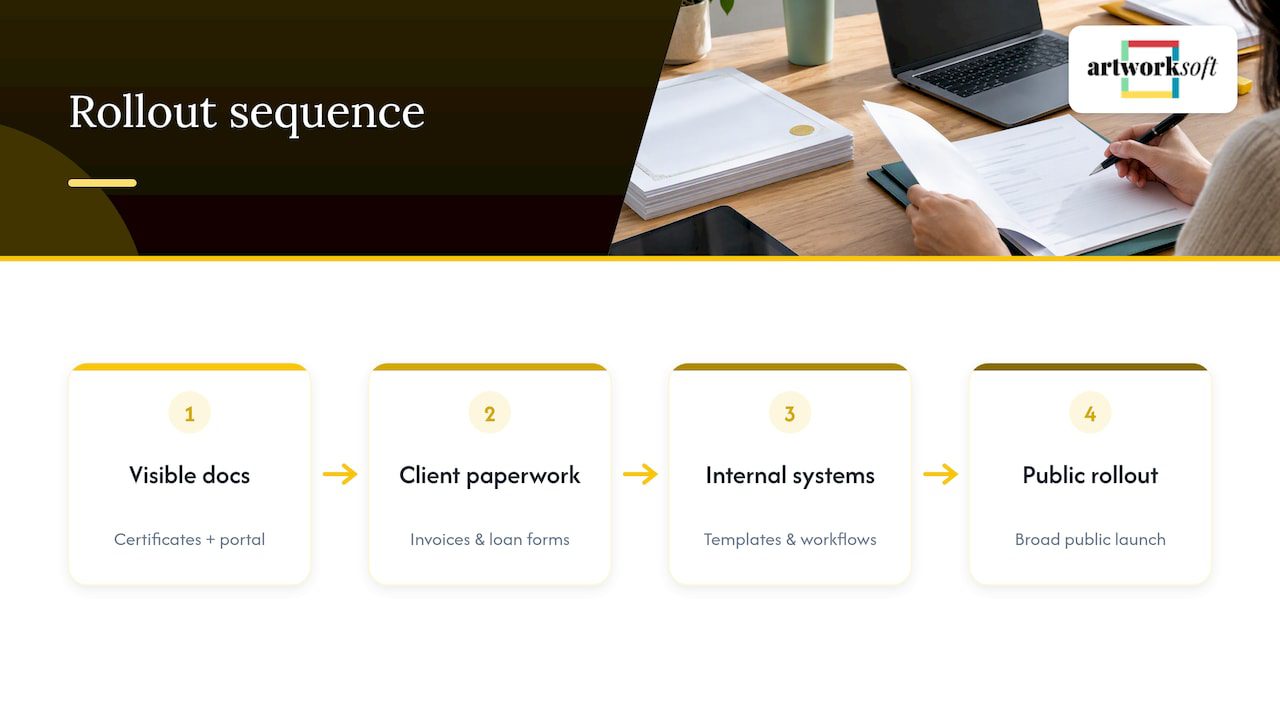
Galleries that roll out white label branding successfully tend to follow a narrow, predictable pattern rather than a dramatic overhaul. They start with the two documents collectors see most often, the Certificate of Authenticity and the client portal page, and get those templates right before touching anything else.
A gallery managing a few hundred works might launch branded certificates and a portal in the first two weeks, then add branded invoices and loan paperwork once staff are comfortable with the new templates. Collectors notice the certificate first because it travels with the artwork, so a clean, consistent design there builds confidence before any other branded document even appears. Museums and institutions that have published provenance work, such as the Carnegie Museum of Art, illustrate the same principle at a larger scale: a phased approach that keeps prose provenance intact while progressively adding structured data lets an institution improve search and linking without disrupting the workflows staff already know.
Smaller galleries can apply the same logic at a fraction of the scale. The lesson that carries over is sequencing: visible, high-traffic documents first, internal systems second, broad public rollout last.
Pragmatic Priorities for Small Galleries and Collectors
Not every branded document needs to launch at once. We suggest starting with certificates and the client portal page, since those are what collectors actually see and judge first. Invoices, reports and internal templates can follow once the high-visibility pieces are working well.
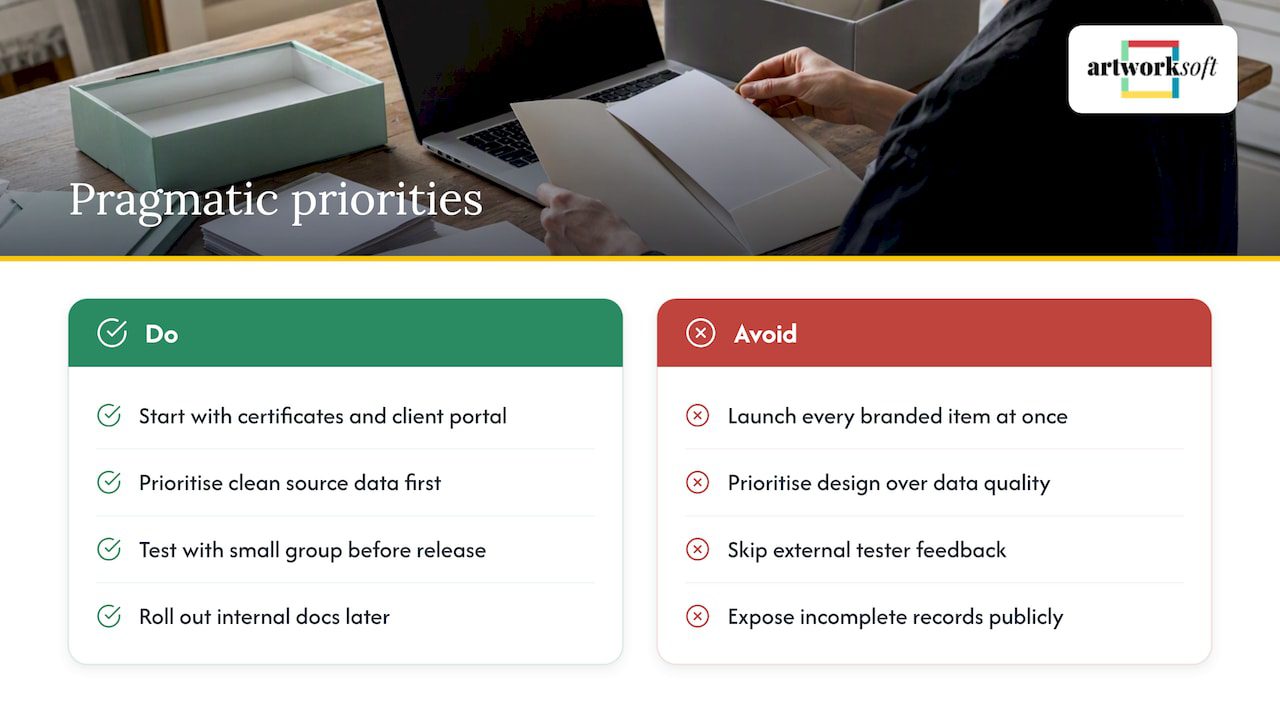
Clean source data matters more than template design. A beautifully branded certificate built on an incomplete or inconsistent record will eventually expose that gap, usually at the worst possible moment, like an insurance claim or a sale.
Test with a small group of trusted collectors or staff before any public release. Their questions reveal formatting problems and missing fields faster than internal review ever does.
— Nealda
Start Branding Your Gallery Documents Today
We built Artworksoft to put branded portals, certificates, invoices and reports in reach of galleries and collectors without a data-model rewrite or a long implementation project. The same system that tracks valuation, location and provenance also generates the branded documents collectors expect to see.

- Start with the Free Plan to explore core organization and documentation features.
- Move to the Provenance Plan starting at a low monthly price for branded documentation and expanded tracking.
- Request onboarding and collection management services if you want help migrating existing records.
Collectors and galleries that need sourcing support beyond documentation can also review our art sourcing services. For anyone documenting items for insurance alongside branded certificates, this collectibles insurance documentation guide outlines what insurers typically expect to see on file.
FAQ
What Does White Label Branding Mean for a Gallery?
White label branding lets a gallery present client portals, certificates, invoices and online gallery pages under its own logo and design instead of a software vendor’s. The underlying system still handles data, documentation and tracking, but every client-facing output looks like it came directly from the gallery.
Which Records Should We Normalize Before Branding?
Core descriptive fields, including title, creator, date, medium, dimensions, credit line, condition and rights, should be consistent across every record before branded templates go live. Provenance should stay as readable text while structured fields are added alongside it, following guidance from provenance research practitioners.
Do We Need to Follow LIDO or ISO 21127 Exactly?
No. Both LIDO and ISO 21127 work best as conceptual reference models that improve interoperability, not as mandatory checklists that block a practical rollout.
How Much Does Artworksoft Cost for White Label Features?
Artworksoft offers a Free Plan with no published price and a Provenance Plan starting from $5 per month for branded documentation and expanded features. Onboarding and ongoing collection management services are available separately, with pricing provided on request.
What Permission Levels Should a Gallery Set Up First?
Most galleries start with four tiers: public, collector-facing, staff-only and confidential. Setting these tiers before sharing any branded document or portal page keeps sensitive details, like insurance values or unresolved ownership questions, away from client-facing output.
Sources
- LIDO Schema v1.1
- ISO 21127:2014 (CIDOC CRM) preview
- Carnegie Museum of Art provenance work
- Provenance research guidance (Omeka-S / exhibits)