


Galleria collections are the art holdings a gallery, collector, or art-business professional manages with dedicated collection-management software — covering inventory, valuation, provenance, movement tracking, and documentation. The direct recommendation: choose a cloud-based, module-driven platform like Artworksoft that handles all of those functions in one system, with no infrastructure overhead.
The four capabilities that separate a professional system from a spreadsheet:
- Structured valuation formula that applies consistent pricing methodology across every record
- Certificate of Authenticity (COA) PDF generation directly from artwork data
- Movement and location tracking for loans, exhibitions, and transfers
- Spectrum-aligned cataloguing fields that meet US museum and institutional standards
Key Takeaways
Galleria collections managed with cloud-based software require structured valuation, COA generation, movement tracking, and provenance documentation to meet US insurance, tax, and institutional standards.
| Point | Details |
|---|---|
| Cloud SaaS is the baseline | Any system you evaluate must offer automated backups, role-based access, and mobile availability. |
| COA and valuation are non-negotiable | Test both live in the demo using your own artwork data before signing a contract. |
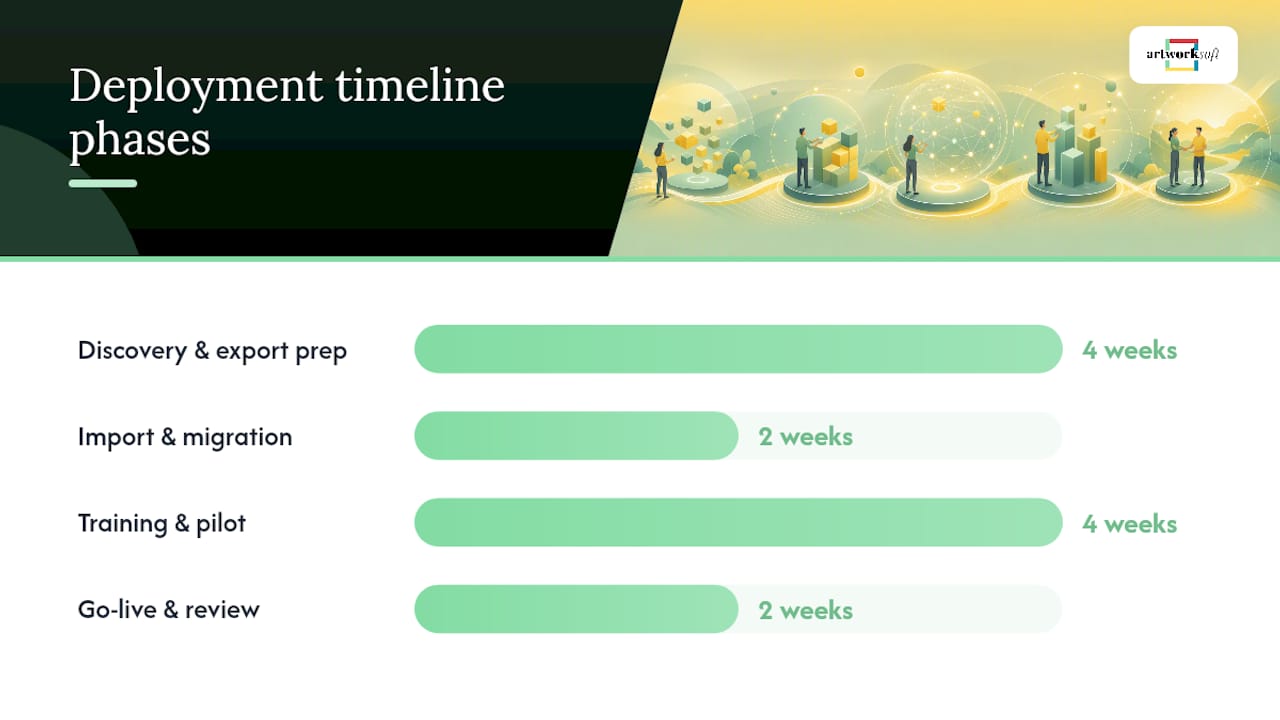
| Budget 8–12 weeks for rollout | Discovery, migration, training, and pilot phases each require dedicated time and staff attention. |
| US compliance needs a full record chain | Provenance, bills of sale, condition reports, and timestamped audit logs are required for IRS and insurance purposes. |
| Artworksoft covers the full checklist | The platform maps inventory, valuation, COA generation, and movement tracking to US gallery and collector requirements. |
What do galleries and collectors actually need from collections software?
The answer depends on scale, but the functional requirements converge faster than most buyers expect. A small commercial gallery and a mid-size private collection both need the same core record structure; they differ mainly in user count and integration depth.
Core use cases every system must cover:
- Artwork records with full metadata fields, condition reports, and high-resolution image attachments
- Provenance fields capturing ownership chain, acquisition documents, and import/export history
- COA generation and professional PDF output for insurance and sales
- Valuation workflows with a structured methodology, not just a free-text price field
- Movement and location logs for loans, exhibitions, and inter-venue transfers
- Sales, consignment, and invoice recordkeeping with transaction histories
- Digital asset management (DAM) for high-resolution images and supporting documents
- Role-based user permissions, audit logs, and encrypted cloud backups
Audience scenarios mapped to priority features:
- Small commercial gallery: COA generation, sales/consignment invoicing, and client-sharing tools are the highest-priority features.
- Mid-size private collection: Valuation workflows, provenance depth, and insurance-ready condition reports matter most.
- Artist foundation: Movement tracking for traveling exhibitions and loan management are critical, alongside DAM for archival images.
- Art consultant or advisor: White-label reporting, portfolio analytics, and multi-collection access across client accounts.
Pro Tip: Before any demo, map your current workflow to these four categories: cataloguing, valuation, documentation, and movement. Vendors who cannot address all four in a single session are likely missing a module you will need within 12 months.
What should you verify in any collections system before buying?
A structured checklist prevents post-purchase surprises. Use this during demos and RFP responses.
Cataloguing and metadata:
- Spectrum-aligned field set (title, medium, dimensions, date, condition, provenance, location)
- Version history on condition reports
- Bulk import and custom field support
Valuation and documentation:
- COA templates with gallery branding, artwork image, and provenance summary
- Condition reporting tools that feed directly into valuation and insurance workflows
Movement, loans, and transactions:
- Location and movement logs with timestamps
- Loan agreement and exhibition workflow support
- Consignment and invoice generation with payment status tracking
Technical and security:
- Cloud SaaS with automated backups and role-based access controls
- API access and integrations with accounting, CRM, and DAM tools
- Mobile access for remote collection management
- CSV and PDF export formats accepted by US insurers and tax advisors
Pro Tip: Ask the vendor to generate a sample COA using your own artwork data during the demo. A system that cannot produce a branded, print-ready COA in under two minutes has a documentation gap that will cost time on every sale.
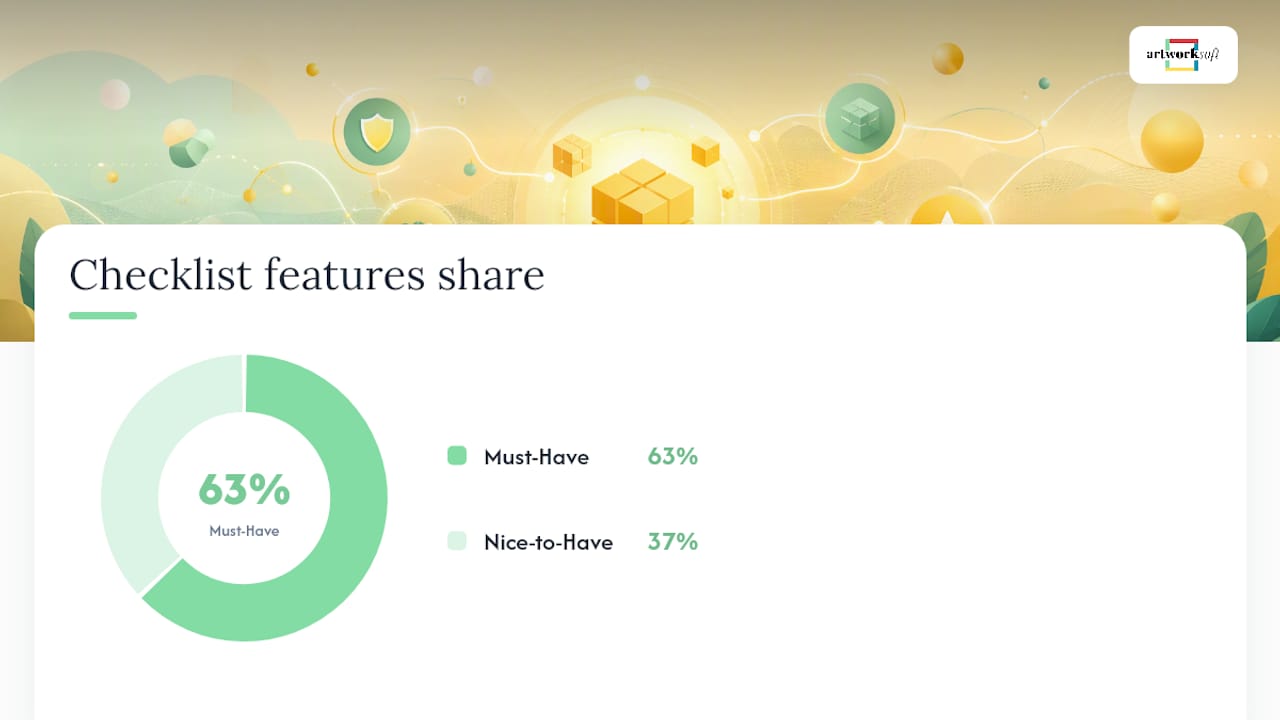
| Checklist Category | Must-Have | Nice-to-Have |
|---|---|---|
| Cataloguing | Spectrum fields, condition history | Custom field builder |
| Valuation | Structured formula, methodology notes | Comparable sales data feed |
| Documentation | COA PDF, invoice generation | White-label branding |
| Movement tracking | Location log, loan workflow | Exhibition planning module |
| Integrations | CSV/PDF export, API access | Native accounting sync |
| Security | Role-based access, cloud backups | SSO, audit log export |
How does Artworksoft address the gallery collections checklist?
Feature mapping:
- Inventory and cataloguing: The art inventory module supports artwork records, location tracking, transaction history, and sharing tools for galleries and collectors.
- Valuation: A structured valuation formula applies consistent methodology across records, reducing pricing inconsistency across a collection.
- Documentation: The art documentation module generates professional PDFs including COAs, invoices, and condition reports suitable for insurance and sales.
- Provenance and authentication: Artworksoft’s guidance on how authentication affects artwork price is built into the platform’s provenance fields, connecting documentation quality directly to valuation outcomes.
- Movement tracking: Location and movement logs track loans, exhibitions, and transfers with timestamps.
- Security: Cloud hosting with backups, role-based permissions, and multi-user access controls.
- White-label branding: Galleries can brand COAs, invoices, and reports with their own identity.
Pro Tip: When booking an Artworksoft demo, bring one real artwork record with provenance gaps. Ask the team to show how the platform flags missing fields and generates a COA from incomplete data. That test reveals documentation workflow quality faster than any feature walkthrough.
What does a realistic deployment look like?
Budget several weeks for a full rollout. The timeline below applies to most gallery and collector deployments moving from spreadsheets or a legacy system.
- Weeks 1–2: Discovery and scoping. Map existing data fields to the new system’s schema. Identify image file formats, unique artwork IDs, and provenance record completeness.
- Weeks 3–4: Data export and migration prep. Export from the current source (spreadsheet, legacy CMS), clean duplicate records, and standardize field formats.
- Weeks 5–6: Import and migration. Load records into the new system. Verify location data, transaction histories, and image attachments against the source.
- Weeks 7–8: User training. Train staff on cataloguing, valuation entry, COA generation, and movement logging. Role-based access should be configured before this stage.
- Weeks 9–10: Pilot. Run live workflows on a subset of the collection. Test COA generation, loan tracking, and report exports.
- Weeks 11–12: Go-live and review. Full collection active. Review audit logs, confirm backup schedules, and verify export formats with your insurer or tax advisor.
Cost expectations: SaaS tiers typically range from a free plan through mid-tier subscriptions that unlock unlimited artworks and branded documentation, up to enterprise tiers with advanced analytics and API access. One-time onboarding or migration service fees are common when collections exceed a few hundred records or require image cleanup.
Migration checklist:
- Export all fields including provenance, acquisition dates, and condition notes
- Confirm image resolution and file format compatibility
- Map unique artwork IDs to avoid duplicate records
- Preserve transaction histories and consignment records
- Run a test import on 20–30 records before full migration
Pro Tip: SaaS deployments with optional migration support are common across the industry; budget for image cleanup and training even when the subscription itself is low-cost. Preparing assets before migration, much like pre-sorting assets by category before a portfolio build, cuts import errors significantly.
U.S. provenance, documentation, and legal considerations
Software is not a substitute for legal counsel, but the records it generates directly affect tax, insurance, and customs outcomes. The IRS and US Customs may require transaction-level documentation for art valued above certain thresholds, and insurers routinely request condition reports and provenance chains at claim time.
Best-practice documentation requirements for US galleries and collectors:
- Timestamped audit logs for every record change, location update, and transaction
- Provenance fields capturing full ownership chain, bills of sale, import/export permits, and acquisition source
- COA templates that include artwork image, medium, dimensions, date, and provenance summary
- Condition reports versioned over time, with condition impact on valuation documented for insurance purposes
- Exportable records in PDF and CSV formats accepted by US tax advisors and insurers
- Secure cloud backups with role-based access to prevent unauthorized record modification
Spectrum alignment, the cataloguing standard widely adopted by US museums and institutional collections, provides a field-level framework that supports accreditation and interoperability between institutions. Systems that follow Spectrum conventions produce records that transfer cleanly between platforms and satisfy institutional governance requirements.
Key compliance point: Maintain provenance records, bills of sale, COAs, and condition reports as a continuous chain. Gaps in that chain affect both insurance claims and IRS fair market value determinations for charitable donations of art.
What questions should you ask vendors before committing?
Use this checklist in every demo and procurement conversation.
Data and migration:
- What export formats does the current system support, and can you import them directly?
- How are unique artwork IDs handled during migration to prevent duplicates?
- Is migration support included in the subscription, or is it a separate service fee?
Security and backups:
4. Where is data hosted, and what is the backup frequency and retention period?
5. How are role-based permissions configured, and can access be restricted by collection or record type?
Valuation and documentation:
6. Can you demonstrate the structured valuation formula with a live record during this session?
7. Show me a sample COA generated from the system — can it carry gallery branding?
Integrations and API:
8. Is there a documented API, and what authentication method does it use?
9. Which accounting and CRM tools have native integrations versus requiring custom development?
Support and SLA:
10. What is the guaranteed uptime SLA, and how are outages communicated?
11. What onboarding and ongoing training resources are included at each subscription tier?
Red flags to watch for:
- No migration support or data portability guarantee
- Closed or undocumented API
- No audit log or version history on records
- Incomplete provenance fields (no ownership chain, no acquisition source)
- COA generation requires manual export to a third-party tool
- Poor or unformatted PDF export quality
Score responses with a simple rubric: must-have (deal-breaker if absent), nice-to-have (adds value but not blocking), or fail (vendor cannot deliver). Any single “fail” on provenance, COA generation, or data export should stop the evaluation.
Why Artworksoft fits the gallery collections use case
The recommendation in this article rests on a direct feature-to-requirement match. Artworksoft supports a structured valuation formula, COA generation from live artwork records, movement and location tracking with timestamps, and audit-ready PDF reports — the four capabilities that US galleries and collectors most frequently cite as gaps in legacy systems and spreadsheets.
The platform’s module-based architecture means a small gallery can start with inventory and documentation, then add valuation workflows and API integrations as the collection grows. The free plan removes the financial barrier to initial evaluation, and the cloud SaaS model eliminates infrastructure overhead that burdens institution-grade deployments.
What the article cannot provide are case studies from specific named clients or verified testimonials; those belong in a live demo conversation where Artworksoft can share current reference accounts relevant to your collection type and size.
— Nealda
Artworksoft offers a free plan and demo for galleria collections
Managing art collections as documented, insurable, and transferable assets requires more than a spreadsheet. Artworksoft gives gallery owners, collectors, and art-business professionals a cloud platform that connects inventory, valuation, provenance, and documentation in one place, with no infrastructure to maintain.

The free plan lets you build real artwork records, test the structured valuation formula, and generate a COA from your own data before committing to a subscription. A live demo goes further: bring one artwork with a provenance gap and ask the team to show how the platform handles incomplete records, flags missing fields, and produces an audit-ready PDF. To get started, sign up for the free plan or book a demo at Artworksoft today.
Useful sources and further reading
- Artworksoft art inventory features — artwork records, location tracking, transaction history, and sharing tools for galleries and collectors
- How authentication affects artwork price — the connection between provenance documentation and market valuation
- Artwork condition impact on valuation — condition reporting tools and their role in insurance and valuation workflows
- Digital documentation practices — how to structure COAs, invoices, and condition reports for professional use
- Gallery services and exhibition planning — module overview for galleries managing exhibitions and loans
- Managing art museum loans — loan tracking workflows and movement management for traveling exhibitions











